Claude for SEO: audit a client site, assign the fixes and send the report
Connect Search Console, GA4, Bing, SE Ranking, Semrush and ClickUp, then let Claude audit the site, create the fix tasks and build the client's report.

Claude can run a full SEO audit for a client, turn the fixes into tasks for your team and write the report the client receives, as long as it can read the client's data. Connect Search Console, Google Analytics, Bing Webmaster Tools, SE Ranking, Semrush and ClickUp to one Datapipe project, connect that project to Claude, and the whole job runs from one chat.
This guide covers which data sources to connect and why, what Claude can only read and what it can change, and the workflow from finding issues to sending the client their report.
Which data sources do you need for an SEO audit?
A thorough audit needs four kinds of data: what searchers saw and clicked, what happened on the site afterwards, where tracked keywords rank, and what's broken on the pages. No single tool covers all four, which is why audits built from one tool miss things. Each data source below fills one gap.
| Data source | What it gives the audit | Why you need it | What Claude can change, if you allow it |
|---|---|---|---|
| Google Search Console | Clicks, impressions, CTR and average position by query, page, country and device | Google's own record of searches. It finds pages close to page one and results that rank but don't get clicked | Submit a sitemap |
| Google Analytics 4 | Organic sessions, engagement and key events by landing page | Shows whether search traffic turns into enquiries and sales, which is what the client pays for | Edit the text of an existing annotation |
| Bing Webmaster Tools | Bing clicks and impressions, crawl errors, pages in the index, inbound links per page, sitemaps | A second search engine and a second crawler. It shows which broken pages other sites still link to | Submit page URLs and sitemaps |
| SE Ranking | Daily positions for your tracked keywords, and site audits with a health score, errors, warnings and the pages affected | Tracked keywords move daily, and the site audit lists technical problems page by page | Add, move or delete tracked keywords |
| Semrush | Domain overview, organic keywords with estimated traffic, Authority Score and backlinks | The competitor and link view. It works on any domain, so you can use it before the client gives you access | Read only |
| ClickUp | Tasks, statuses, assignees and time tracked | Where the fixes get done, so the audit doesn't stop at a list | Create tasks, assign people, set due dates and priority, add tags and comments |
Two more are worth adding when they fit. If the client's site runs on WordPress, the WordPress data source lets Claude change a page's SEO title and meta description, once you allow that change and install the free Datapipe SEO fields plugin. If your team works in Asana or Jira instead of ClickUp, both work the same way, with their own task changes.
Each account added to a project uses one data source from your plan. Projects are unlimited, and the Free plan includes three data sources. The Datapipe pricing page shows the larger plans.
Read-only or write: what Claude can do with each one
Every data source starts read-only. Claude can read the numbers for the audit and reports, but it can't change anything until you allow a specific change on that data source.
You allow changes on the Changes page, per data source, under Allowed changes:
- Read only keeps it as it is.
- Everyday edits allows edits to existing records, such as updating a task's fields or assigning a person. It never allows anything that deletes, sends, publishes, refunds or changes prices.
- Custom lets you tick exactly the changes you want. Creating new ClickUp tasks is one you tick here.
Below the list, Who can make these changes sets which people can use them. An assistant a person connects to Datapipe can make the same changes that person can, never more. Approval sets whether allowed changes apply straight away, whether only sensitive ones wait, or whether every change waits for the owner, an admin or a project manager. Every change is kept in Activity.
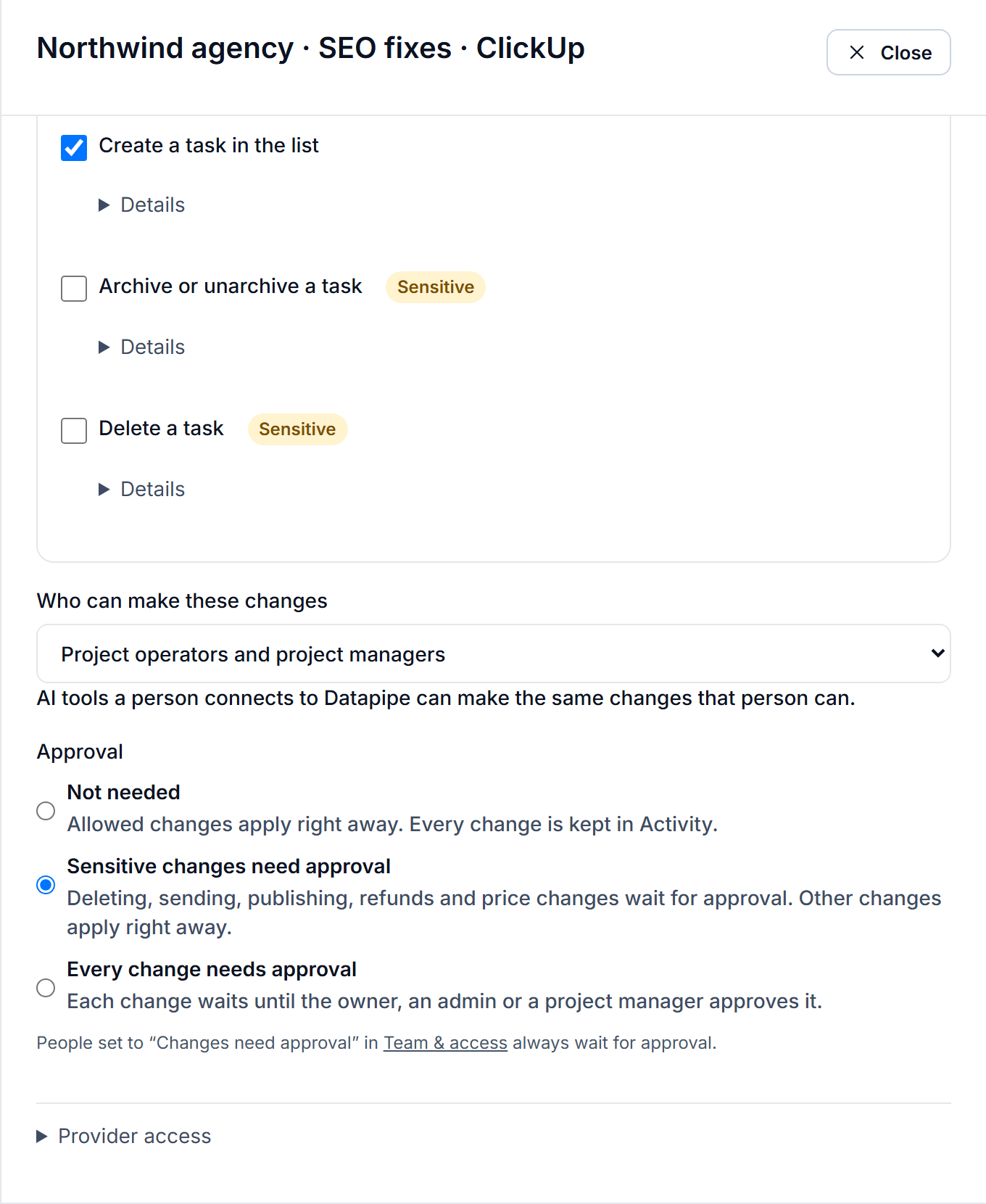
For an SEO audit, a sensible setup is read-only for Search Console, Google Analytics, Bing and Semrush, and write access for ClickUp so Claude can create and assign the fix tasks.
Step 1: Create the client's project and add the data sources
One client is one project. Open Projects, enter the client's name under Create a project and click Create project. Then add the data sources in two groups.
The client's accounts: Search Console, Google Analytics and Bing. On the project's card, click Request data access and send the link to the client. They sign in with their own Google account to choose their Search Console property and GA4 property, then click Sign in to Bing Webmaster and choose their site. You never handle a password, and the link only opens that one project.
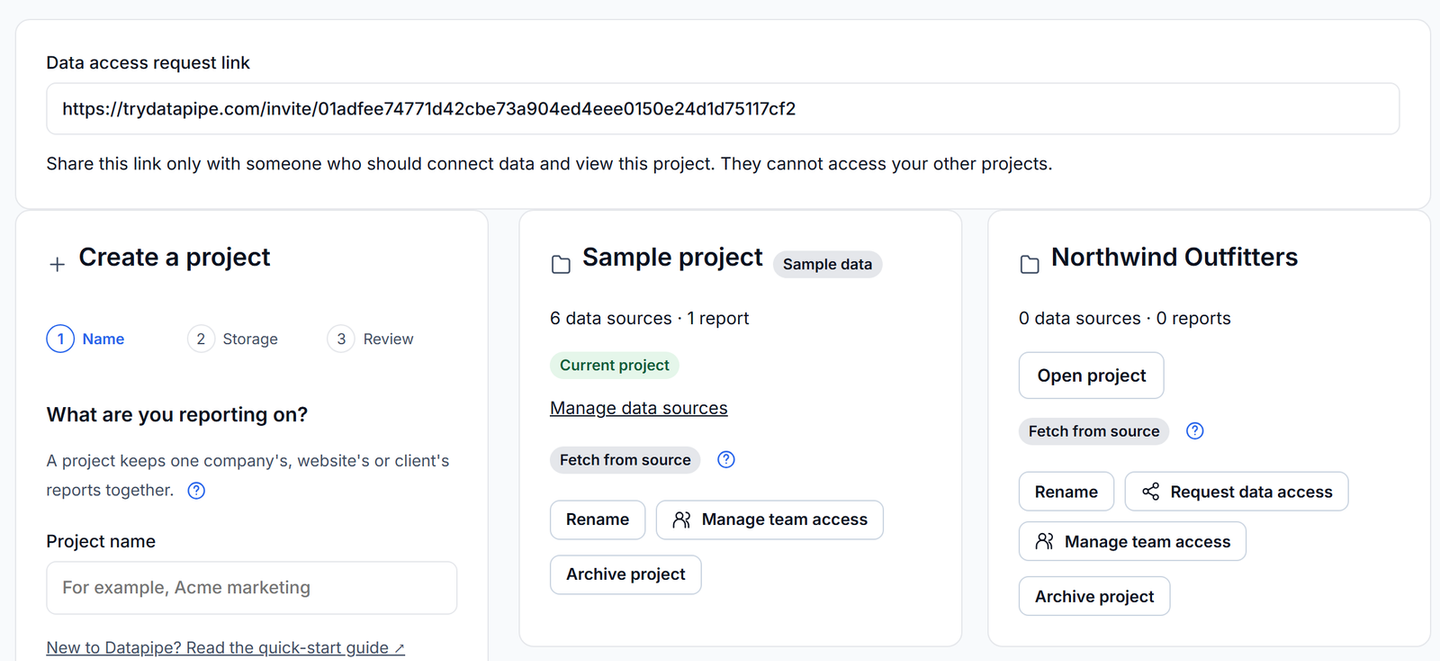
If you already have access to their properties, add them yourself instead. Open Data sources, click Add data source, choose the Google Search Console data source, the Google Analytics data source or the Bing Webmaster data source, and sign in.
Your agency's accounts: SE Ranking, Semrush and ClickUp. These run on your own subscriptions.
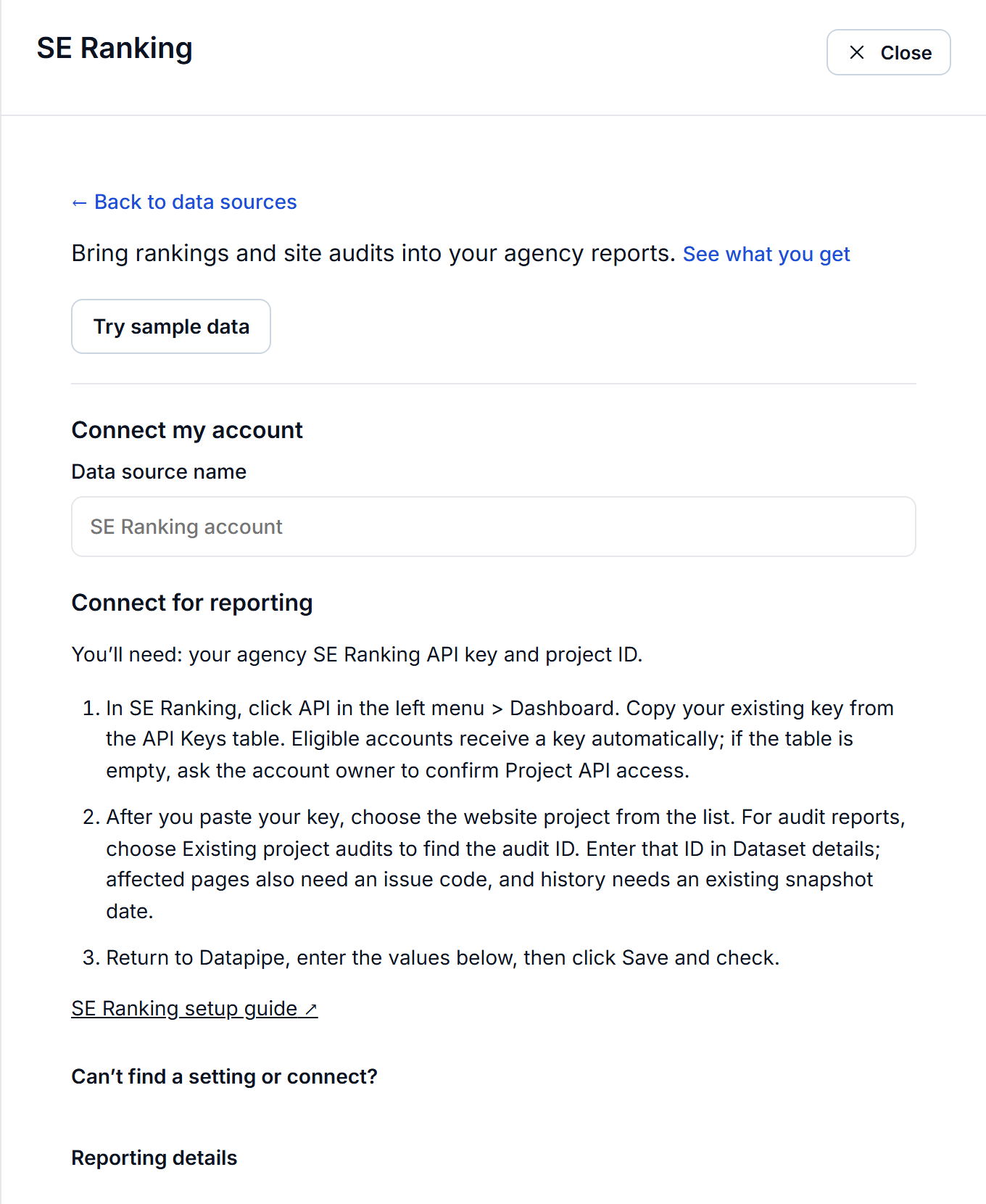
- For the SE Ranking data source, paste your SE Ranking API key, then choose the client's website project from the list. Create that project in SE Ranking first, with the keywords you agreed in the proposal, and run its site audit.
- For the Semrush data source, paste your Semrush API key, enter the client's domain and pick the regional database, such as us or uk.
- For the ClickUp data source, click Sign in to ClickUp and choose the list where the SEO tasks should go.
Then open Changes, find the ClickUp data source and allow the task changes you want, as in the previous section.
Step 2: Connect Claude to the project
You connect Claude once, and it covers every project you allow.
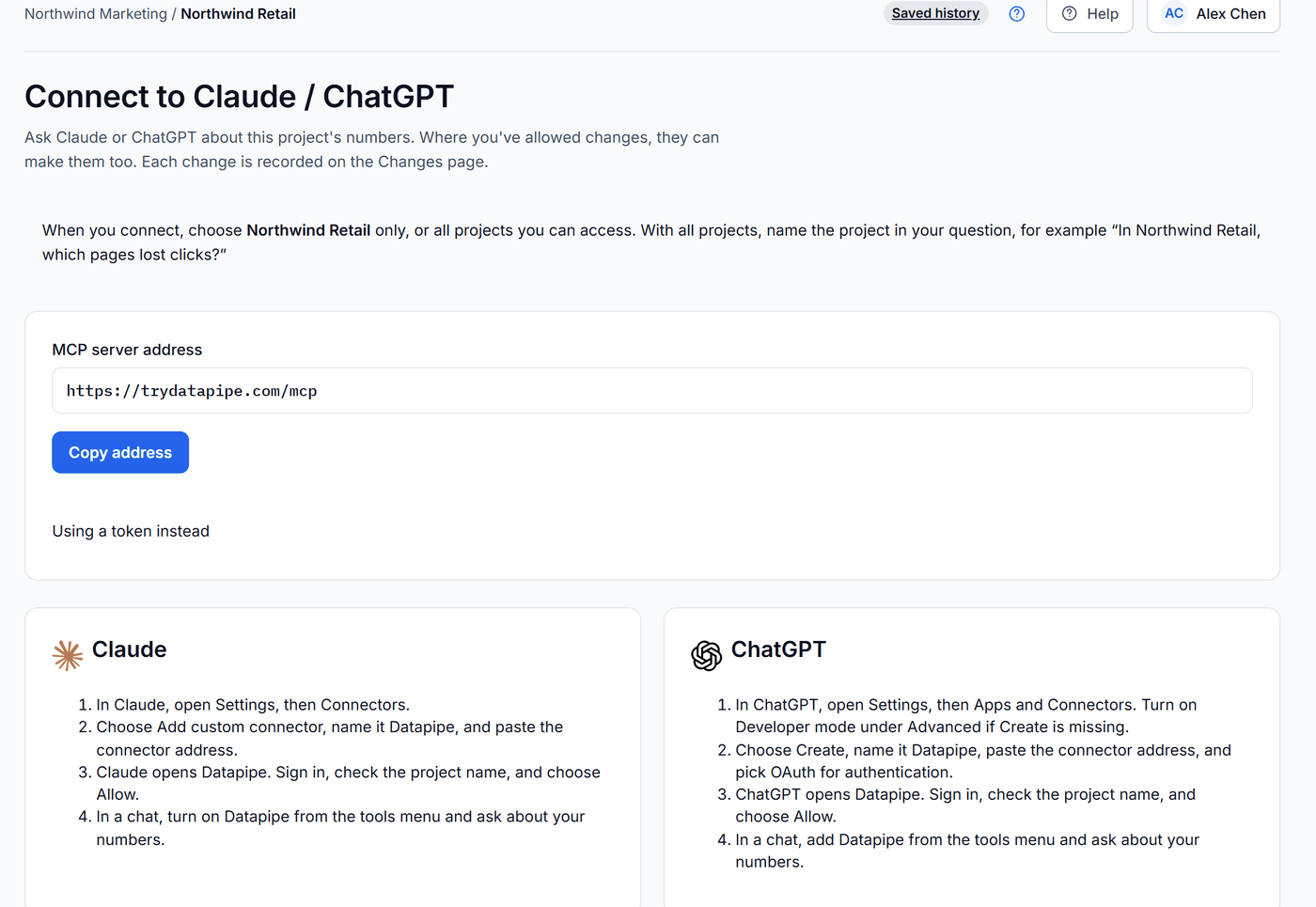
- In Datapipe, open Settings, then Claude / ChatGPT, and click Copy address. The address is https://trydatapipe.com/mcp.
- In Claude, open Customize, then Connectors, click + Add, then Add custom connector. Name it Datapipe, paste the address and add it.
- Claude opens Datapipe. Sign in, choose the client's project or all your projects, and click Allow.
- In a chat, click +, open Connectors and switch Datapipe on.
Claude's Free plan allows one custom connector, which is enough because Datapipe brings every data source through it. On Team and Enterprise plans an owner adds it first under Organization settings, then Connectors. Anthropic's help page on custom connectors using remote MCP has the current menu names, and the guide to connecting Search Console and GA4 to Claude shows each screen. ChatGPT works with the same address under Settings, then Apps and Connectors, then Create.
Step 3: Identify the issues
One prompt has Claude read four data sources and rank what it finds. A table with fixed columns keeps the answer usable, and "quick wins first" makes Claude weigh effort against impact instead of listing every warning.
SEO audit with a ranked fix list
Use Datapipe, project "[project name]". Run an SEO audit of [domain] for the last 28 days. Read the latest SE Ranking site audit and its issue breakdown, Bing Webmaster crawl issues, Search Console queries and pages, and SE Ranking keyword rankings. Give me a prioritised fix list as a table with these columns: issue, evidence (with the numbers), pages affected, expected impact, effort. Put quick wins first. Don't change anything.
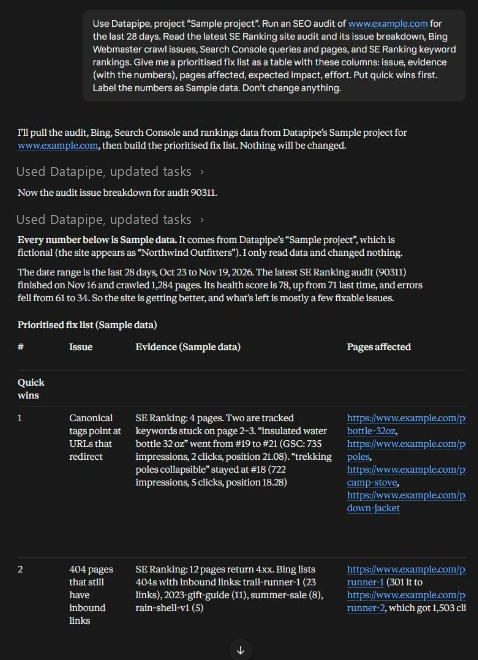
The value is in the joins, because each tool only sees its own part. Here's what that looked like on a fictional outdoor store (Example data):
- 404 pages with links. SE Ranking found 12 pages returning 404. Bing showed that four of them still had 47 inbound links between them, so redirecting those four recovers most of the value.
- Broken links on the best pages. SE Ranking found broken internal links on 9 pages. Search Console showed six of those pages earned 20,010 clicks in 28 days, which moves an ordinary warning to the top of the list.
- A strong keyword with a weak result. "Waterproof hiking boots" climbed from 6 to 4 in SE Ranking, but Search Console showed a 4.28% CTR. The fix is the title and description, not the ranking.
Treat the impact and effort columns as Claude's estimates, and check the top rows yourself before they go to a client.
For a proposal, run a lighter version before you have access. Semrush reads any domain, so a Semrush data source for the prospect is enough for Claude to write a one-page snapshot of where the site stands, its biggest opportunities and the access you'll need. Each domain uses one data source, so remove it after the proposal.
Step 4: Turn the fixes into ClickUp tasks
With task changes allowed on the ClickUp data source, Claude can create the tasks straight from the audit, with the evidence attached.
Create the fix tasks
Use Datapipe, project "[project name]". For each quick win in the fix list above, create a ClickUp task in [list name]: the issue as the task name, the evidence and affected pages in the description, high priority, due [date], assigned to [person]. Then list the tasks you created.
Claude makes each change through Datapipe. If approval is set to Not needed, the tasks appear in ClickUp straight away. If changes need approval, they wait on the Changes page until the owner, an admin or a project manager approves them. Either way, every task Claude created is listed under Activity with who asked for it.
Your team then works from ClickUp as usual, and the next audit shows whether the fixes landed: errors falling in SE Ranking, the 404s gone from Bing, clicks rising in Search Console.
Step 5: Build the client deliverable in Claude
Claude can turn the same data into whatever the client should receive. Ask in the same chat, so it reuses the numbers it already read.
Client slide deck
Turn this audit into a 6-slide PowerPoint deck I can send to the client: a title slide, where the site stands, the top three fixes with their evidence, what we'll do this month, and how we'll measure it. Keep the numbers exactly as they are above.
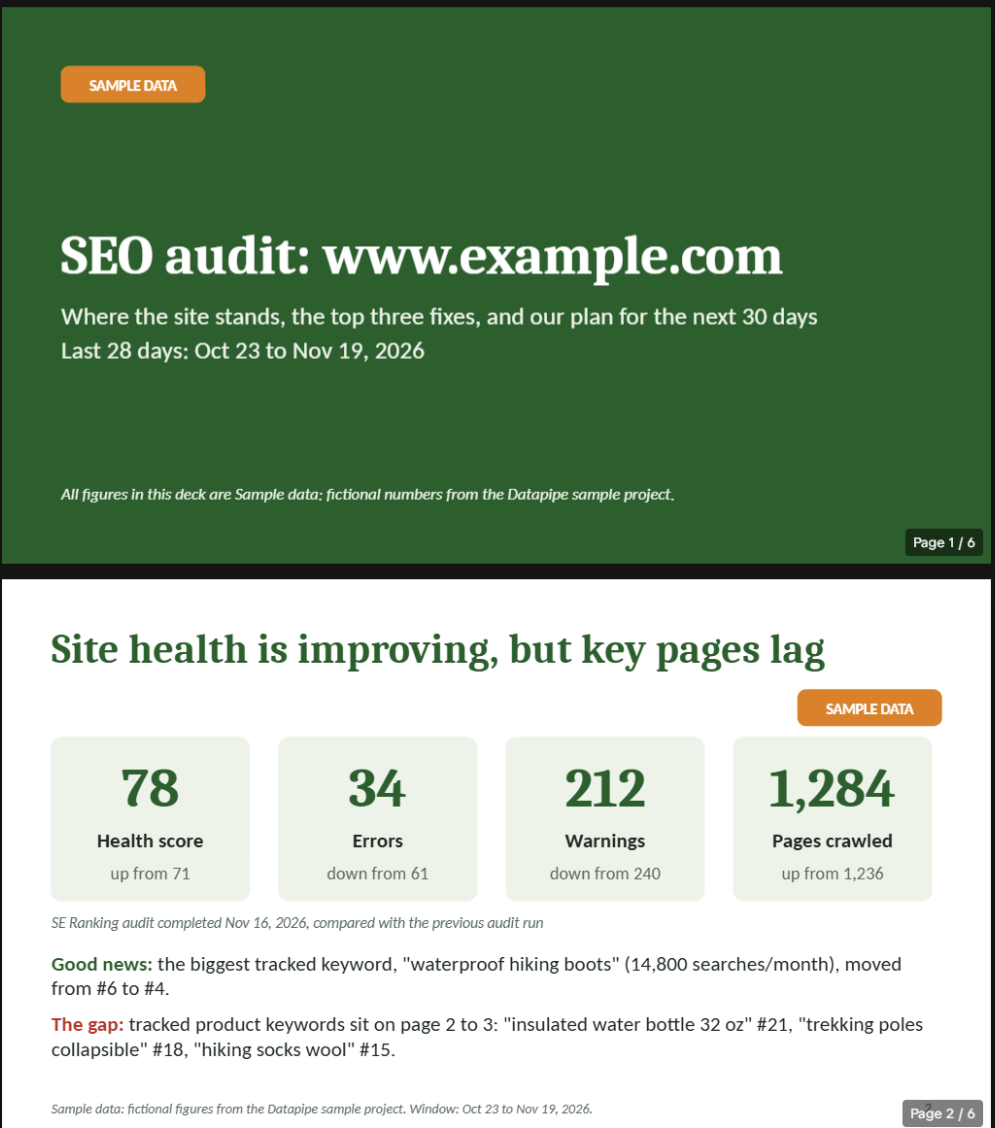
The same works for a one-page PDF summary, or an HTML dashboard:
Monitoring dashboard
Use Datapipe, project "[project name]". Build an SEO monitoring dashboard for [domain] for the last 30 days compared with the 30 days before, as an artifact: Search Console clicks and impressions by day, the top 10 queries, SE Ranking keywords in the top 10 with rank history, the latest site audit health score and errors, Bing crawl errors and Semrush referring domains. Don't change anything.
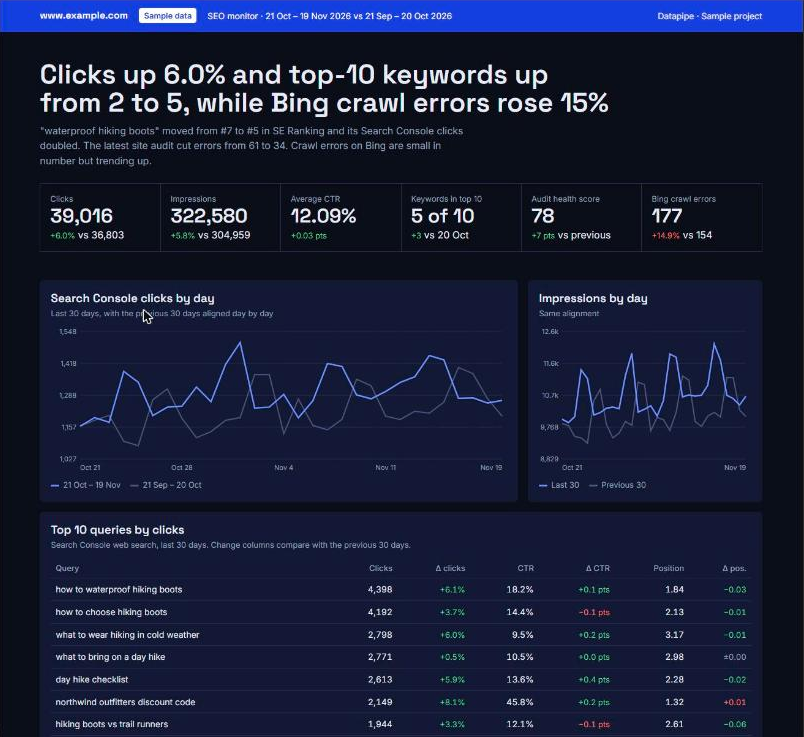
A dashboard Claude saves can rerun its queries when it's opened. The first time, Claude asks for permission to let it use your Datapipe connector. Click Allow, or ask for a static version with the numbers built in. Saved dashboards need a paid Claude plan, and everyone who opens one needs Claude, so download the deck or PDF when it's for the client.
Step 6: Keep the client report running in Datapipe
Claude is the fastest way to produce the first audit and answer questions. For the report the client gets every month, let Datapipe refresh and send it so nobody has to rebuild it.
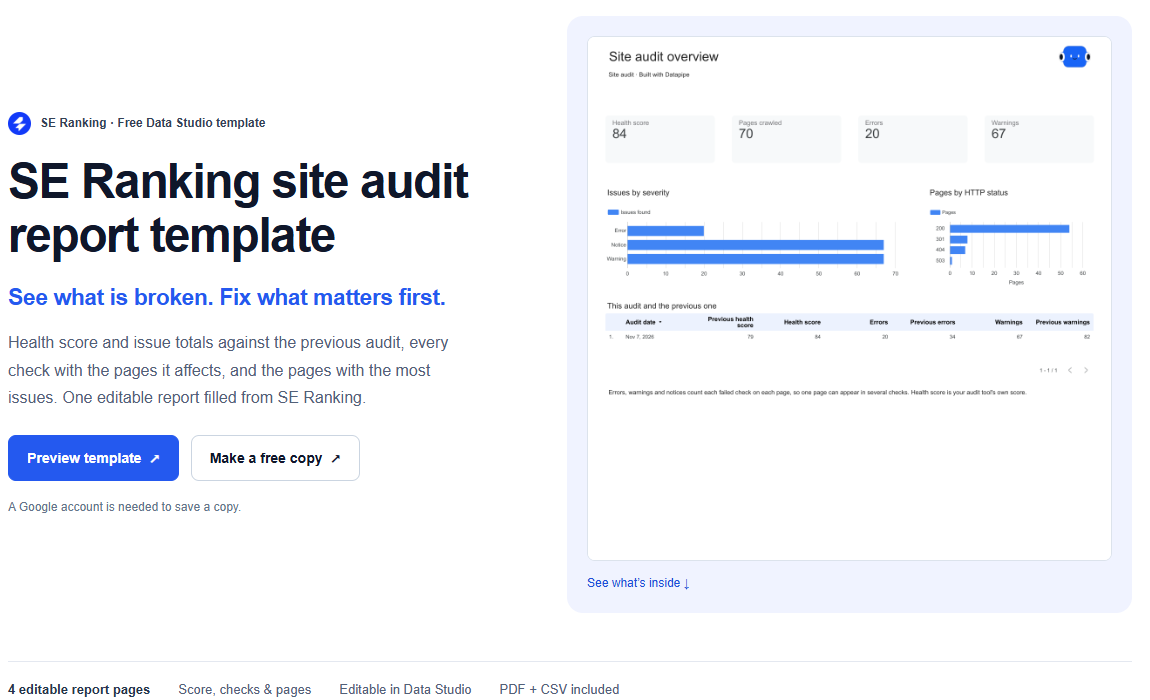
Report templates. Datapipe's Data Studio dashboards are ready-made and refresh on their own. The client opens them in a browser without a Claude account. For this job, start with the SEO monitoring dashboard template, which compares the last 28 days with the 28 before, and the SE Ranking site audit report template, which tracks the health score and every check against the previous audit. Open Reports, then Add a report, click Use template, pick the client's account and click Open my dashboard.
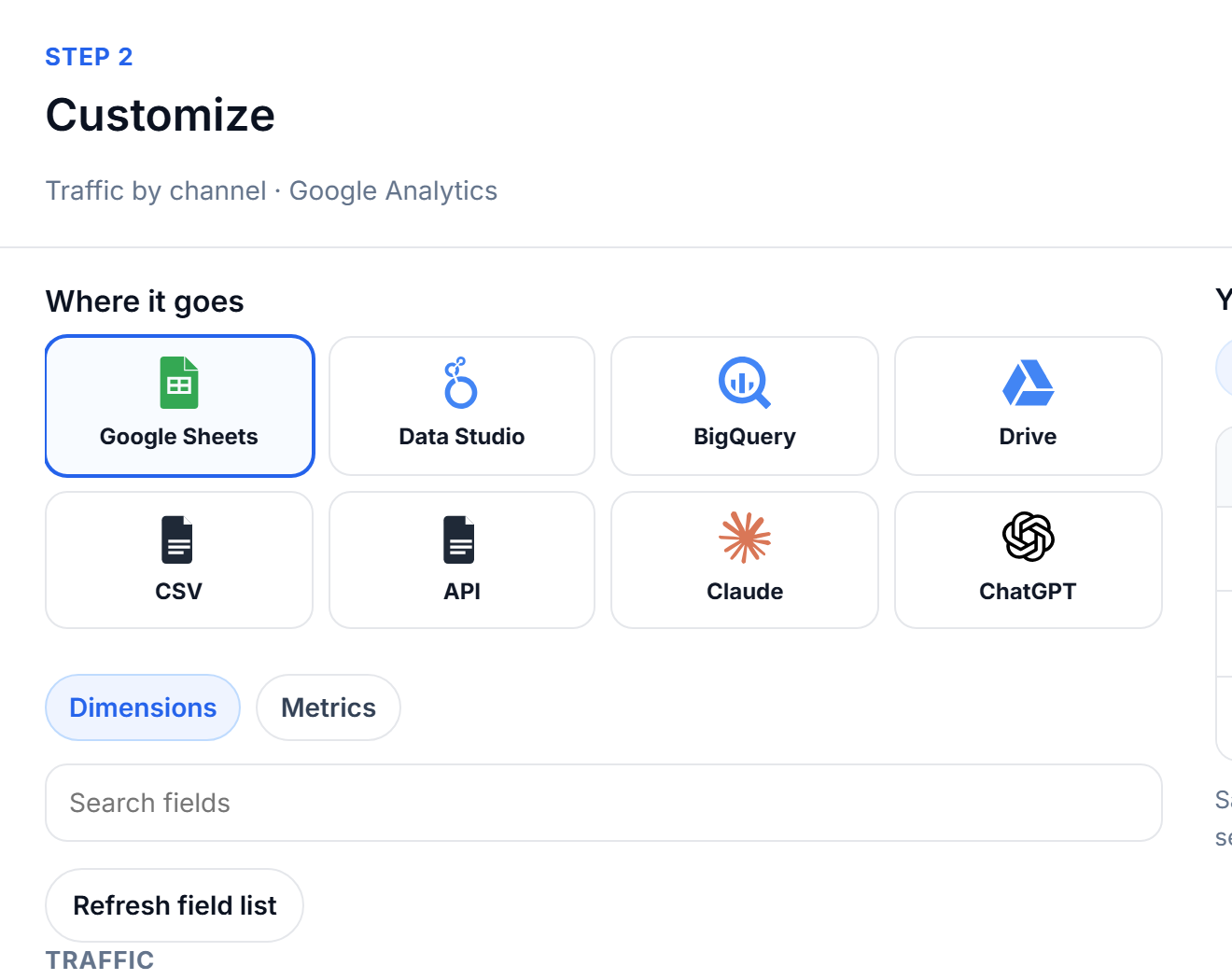
Spreadsheets and other destinations. When you create a report, Where it goes offers Google Sheets, Data Studio, BigQuery, Google Drive, CSV, the API, Claude and ChatGPT. Excel and Power BI connect through live feeds. The Datapipe destinations page lists them all, including data warehouses.
Report Studio. For a branded report with your logo, a private client portal, PDF and PowerPoint export and scheduled email delivery, use the Report Studio add-on. Claude can draft a Report Studio report from the same project for you to review. It starts at $15 a month for five active reporting projects.
Whichever you choose, set the schedule on the report's Schedule & send page, and ask Claude each month for the summary that goes on top:
Monthly client summary
In [project name], compare last month with the month before: Search Console clicks, impressions, CTR and position; Google Analytics organic sessions and key events; SE Ranking keywords in the top 3 and top 10; the SE Ranking audit health score and errors; Semrush referring domains; and the ClickUp SEO tasks completed. Write a five-sentence summary for the client: what improved, what slipped and why, and the three fixes we'll do next month. Use only numbers from Datapipe. Don't change anything.
The SEO metrics to report to clients every month covers which numbers belong in that report and which to leave out.
Want to try it before connecting a client?
Open Projects, then Explore with Sample data, then Open sample project. It comes with Search Console and Google Analytics, you can add SE Ranking, Semrush and Bing with one click each, and it doesn't use a data source from your plan. Every read-only prompt above works on it. Changes such as ClickUp tasks need a real account, so connect your own when you're ready.
Why don't the numbers match between tools?
Each tool measures something different, and the gaps are normal. Explain them before the client asks.
| Comparison | Why they differ | What to report |
|---|---|---|
| Search Console position vs SE Ranking position | Search Console averages every impression across devices and places. SE Ranking runs one check a day from one location | The rank tracker for "where do we rank", Search Console for "what did searchers see" |
| Search Console clicks vs GA4 organic sessions | GA4 counts sessions, includes Bing and other engines, and misses visitors who block analytics | Clicks for search performance, sessions and key events for results |
| Semrush traffic vs Search Console clicks | Semrush estimates traffic from its keyword database | Search Console once you have access, Semrush for competitors |
| Semrush referring domains vs Bing inbound links | Different crawlers, different link indexes | One backlink source, used consistently |
If you see this, do that
Claude says it can't create the ClickUp task. The change isn't allowed yet. Open Changes, choose the ClickUp data source and tick Create a task in the list under Custom. Also check that the person who connected Claude is listed under Who can make these changes.
The tasks didn't appear in ClickUp. Approval is on. The changes are waiting on the Changes page for the owner, an admin or a project manager.
Claude says more than one account is connected. The project has two Search Console properties or two SE Ranking projects. Name the one you mean in the prompt, or keep one per client project.
The SE Ranking audit numbers are old. Datapipe reads audits that already ran in SE Ranking and doesn't start a crawl. Run or schedule the audit in SE Ranking first.
Search Console numbers stop three days ago. Google's last two or three days aren't final. Ask for date ranges that end at least three days back.
Claude makes up a number. Ask it to show the Datapipe read the number came from. If a read fails, Datapipe returns an error, never invented figures.
Frequently asked questions
Which data sources do I need for a client SEO audit?
Search Console for clicks, queries and pages, Google Analytics 4 for organic sessions and key events, Bing Webmaster Tools for a second search engine and its crawl errors, SE Ranking for daily rankings and site audits, and Semrush for competitors and backlinks. Add ClickUp, Asana or Jira if you want Claude to turn the fixes into tasks.
The client grants Search Console, Google Analytics and Bing. SE Ranking, Semrush and your task tool usually run on your agency's own accounts.
Can Claude create tasks in ClickUp?
Yes, once you allow it. In Datapipe, open Changes, choose the ClickUp data source and tick Create a task in the list, plus Assign or unassign a person if Claude should assign them. Claude can then create tasks with a name, description, due date and priority.
You also choose who can make the change and whether it needs approval. Every task Claude creates is listed under Activity.
Can Claude change my client's website?
Only in the ways you allow, one data source at a time. With Search Console it can submit a sitemap, with Bing it can submit page URLs and sitemaps, and with WordPress it can change a page's SEO title and meta description. Everything else in this guide is read-only, and every change is recorded in Datapipe.
Can Claude make a PowerPoint or PDF report for the client?
Yes. After the audit, ask in the same chat for a slide deck or a one-page PDF and Claude builds it from the numbers it already read. Download it and send it. For a report that refreshes every month without you, use a Datapipe report template, a Google Sheet or the Report Studio add-on.
Do I need a paid Claude plan?
Not for the audit and task prompts. Claude's Free plan allows one custom connector, and Datapipe brings every data source through that one connector. Saved dashboards that refresh are part of Claude Data, which Anthropic lists for its Pro, Max, Ultra, Team and Enterprise plans.
Can my client see the report without a Claude account?
Yes, if you send it through Datapipe. Report templates open in Data Studio, Report Studio reports open in a private client portal or as PDF and PowerPoint, and Google Sheets works for anyone you share it with. A dashboard built inside Claude needs Claude to open.
Put your marketing numbers on autopilot
Datapipe connects your data sources and keeps your reports refreshed on a schedule.
Start free