How to combine Facebook Ads and GA4 in one report
Tag every ad, connect Facebook Ads and GA4, copy two free Data Studio templates, and fix the three problems that make the numbers disagree: lost UTM tags, slow pages and purchase gaps.

To put Facebook Ads and GA4 in one report, tag every ad with its ad ID, connect both accounts to the same Datapipe project, and copy two free Data Studio report templates: one for Meta Ads, one for GA4. Then match the two tools ad by ad, not on their totals. This guide walks through each step, shows the report pages you'll end up with, and covers how to fix the three problems that make Facebook and GA4 disagree: lost UTM tags, slow landing pages and purchase gaps.
By the end you'll have a client report that refreshes on its own and an answer ready for the question every client asks: "why does Facebook say more than Google Analytics?"
What you'll need
Check four things first. Each one, if it's missing, stops the setup halfway through and sends you back to the client asking for access you could have requested on day one.
A Facebook user with reporting access to the client's ad account. Not sure? Ask the business administrator to check under Meta Business Settings, then Accounts, then Ad accounts.
A Google account with at least Viewer access to the client's GA4 property. An administrator grants it in Google Analytics under Admin, then Property access management.
Permission to edit the ads in Ads Manager, so you can add URL parameters. Without tags on the ads, GA4 can't tell which ad a visit came from.
A Datapipe account. The Free plan includes 3 data sources, so Facebook Ads and GA4 for one client fit with room to spare.
Step 1: Tag every ad with its ad ID
The ad ID is what lets GA4 and Facebook Ads talk about the same ad. Put it in utm_content on every ad, and keep the source and medium identical everywhere.
In Ads Manager, open each ad, scroll to Tracking, and paste this into URL parameters:
utm_source=facebook&utm_medium=paid_social&utm_campaign={{campaign.name}}&utm_content={{ad.id}}Meta replaces the values in double braces when someone clicks. GA4 reads them as described in Google's guide to collecting campaign data with custom URLs, and utm_content arrives in GA4 as Session manual ad content.
Use {{ad.id}}. Not the name. A name parameter keeps the name the ad had when it was first published, so a renamed ad stops matching its GA4 sessions. Names drift. IDs don't.
Then check the tags actually survive the click, before you trust any report built on them, because a redirect on the client's site can quietly strip every parameter you just added. Copy the ad's website URL with its parameters from Ads Manager, open it in a browser, and look at the final address. If the page redirected, say from /trail-jacket to /products/trail-jacket-mens, and the utm_ parameters vanished, GA4 will file those visits as untagged Facebook referrals. Ask whoever owns the website to keep the query string on that redirect, or point the ad straight at the final URL.
Step 2: Connect Facebook Ads
In Datapipe, open Data sources, choose Add data source and pick the Facebook Ads (Meta Ads) data source. Click Sign in with Facebook using the Facebook user that has reporting access to the ad account, and include that account when Meta asks which permissions to grant. Back in Datapipe, select the Facebook authorization, click Load / refresh ad accounts, choose the ad account by name and click Add data source. Nothing to copy. No ad account ID, no access token.
Meta is still reviewing Datapipe's access, so live Meta Ads reporting starts once that approval lands. Until then, copy the template and set everything else up.
If the ad account doesn't appear, the Facebook user doesn't have access to it, or it was left out of Meta's permission choices. Check access in Meta Business Settings, then reconnect and include the account.
Step 3: Connect Google Analytics
In Add data source, pick the Google Analytics 4 data source. Click Sign in with Google with the Google account that can view the property, and allow Analytics reporting access. In Find a source account, search by property name or ID, choose the client's GA4 property and click Add data source.
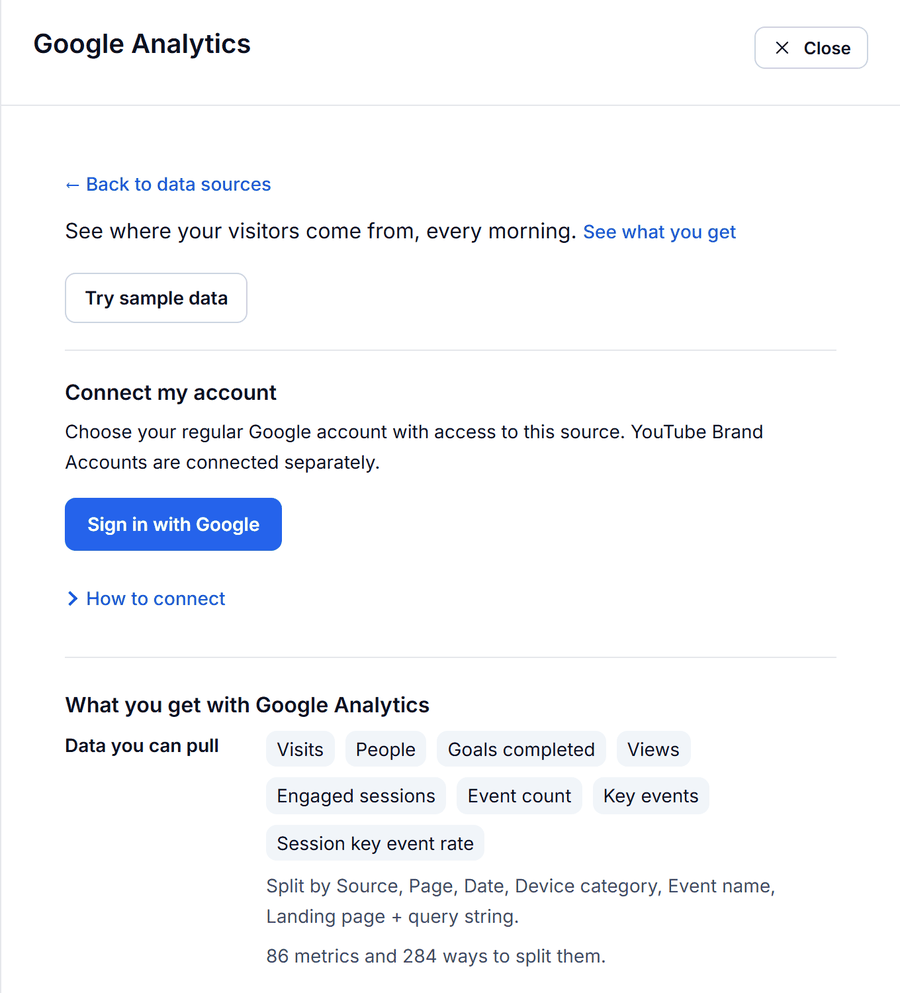
If the property is missing, that Google account doesn't have Viewer access yet. Ask an administrator to add it under Admin, then Property access management, return to Datapipe and click Refresh accounts.
Step 4: Copy the Meta Ads report template
Open Reports in Datapipe, choose the Meta Ads dashboard under Data Studio dashboards and save your Data Studio copy. The Meta Ads ROAS report template has five pages, and the first one answers the question clients ask first: what did the spend buy?
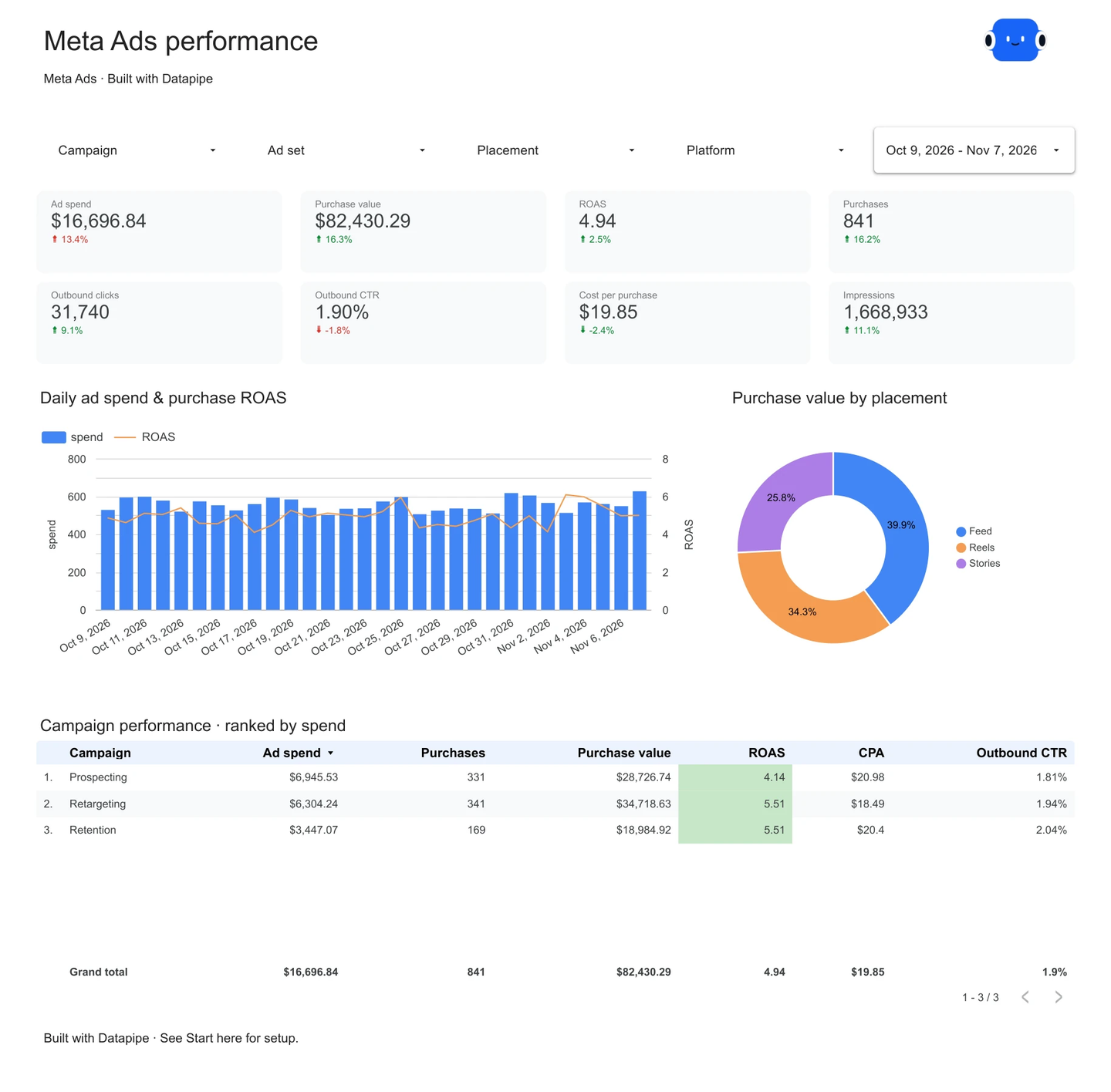
The Overview page puts ad spend, purchase value, ROAS, purchases, outbound clicks, outbound CTR, cost per purchase and impressions at the top, each against the previous period. Below that sit daily spend with ROAS, purchase value by placement, and a campaign table ranked by spend. Use the Campaign, Ad set, Placement and Platform filters across the top to narrow it to one campaign or to Instagram only.
ROAS in the template is total purchase value divided by total spend, and cost per purchase is total spend divided by purchases. Both use totals rather than an average of each row's ratio, so a small campaign with a lucky week can't skew the number.
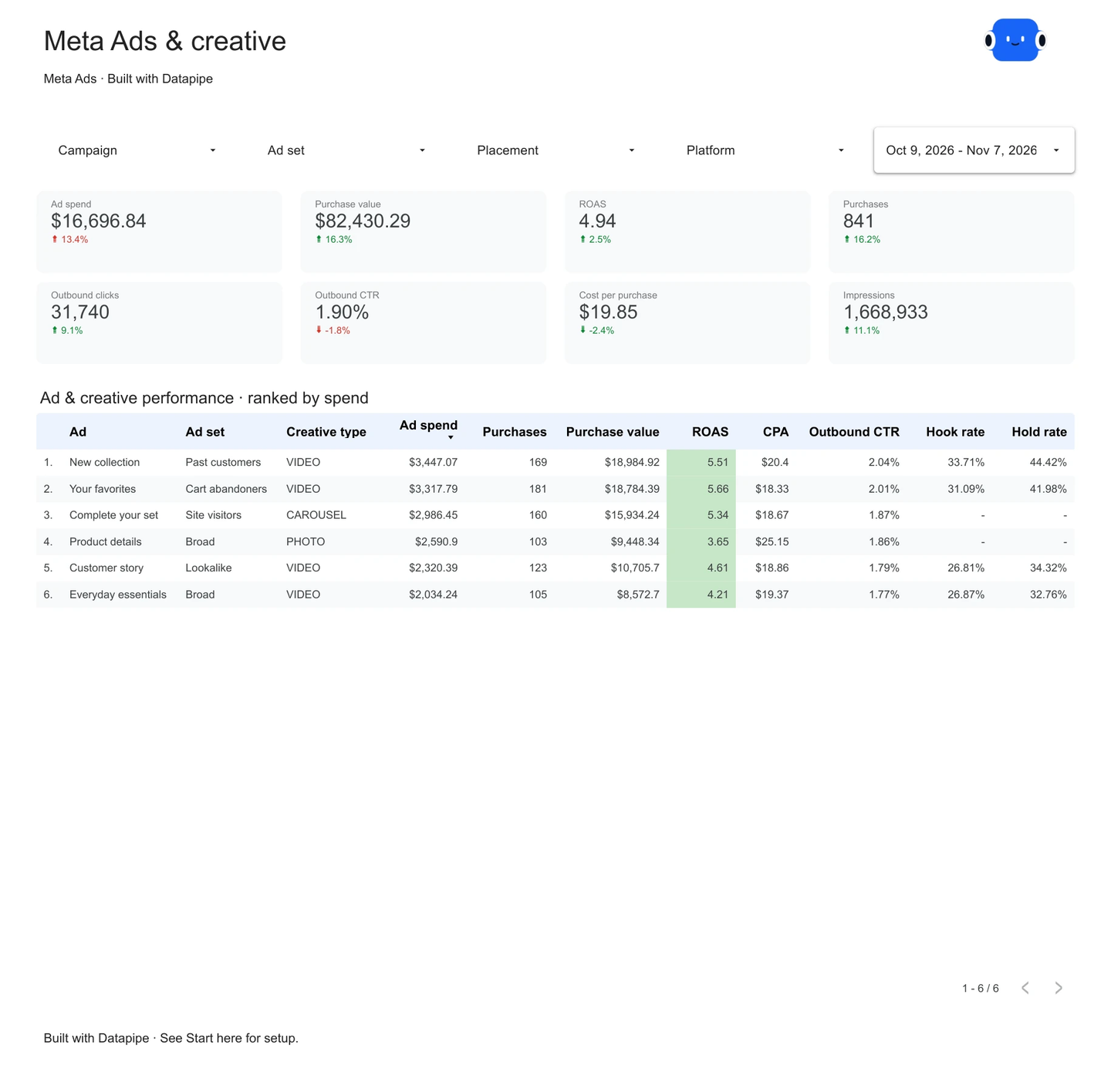
The Ads and creative page compares creative formats by purchase results and cost, so you can see which ads earn their budget. The Reach and fatigue page plots daily frequency against cost per purchase, with bubble size showing spend: when frequency climbs and cost per purchase climbs with it, the audience has seen the ad too often.
Step 5: Copy the GA4 report template
Back in Reports, choose the GA4 dashboard under Data Studio dashboards and save your Data Studio copy of the GA4 traffic acquisition report template.
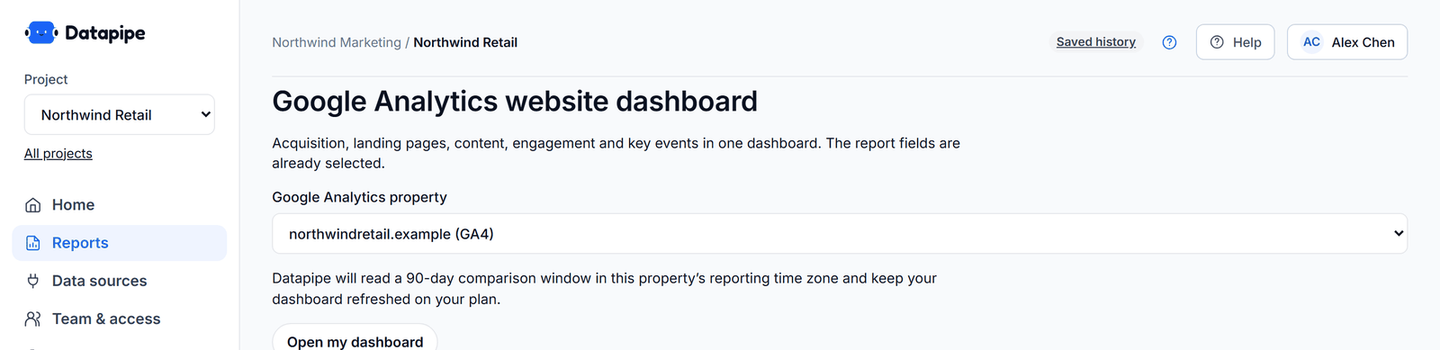
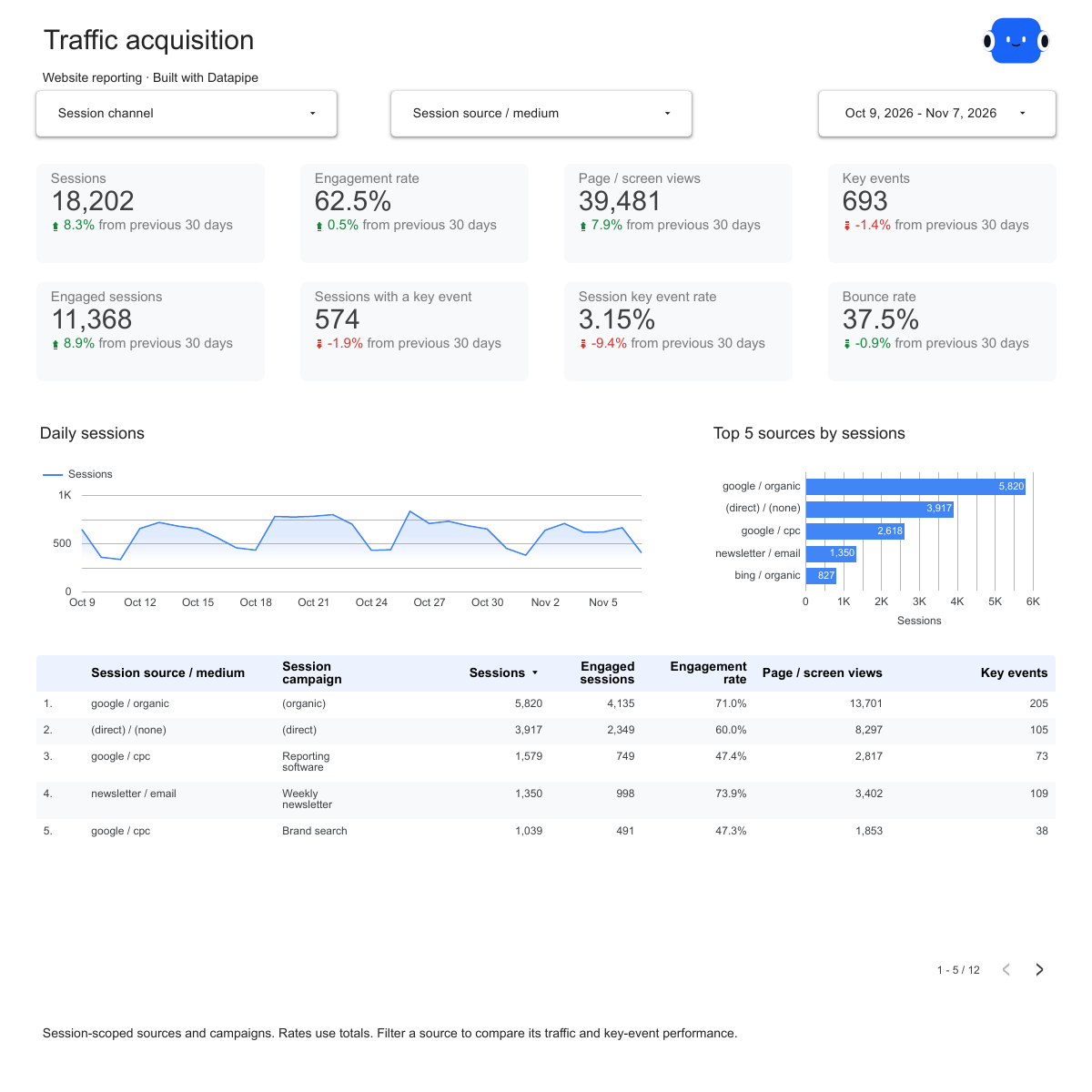
On the Acquisition page, filter to the source and medium your tags set, facebook / paid_social. One filter. It turns the page into "what did Facebook ad visitors do?" instead of "what did everyone do?", which is the only version of the page that belongs in a paid social report.
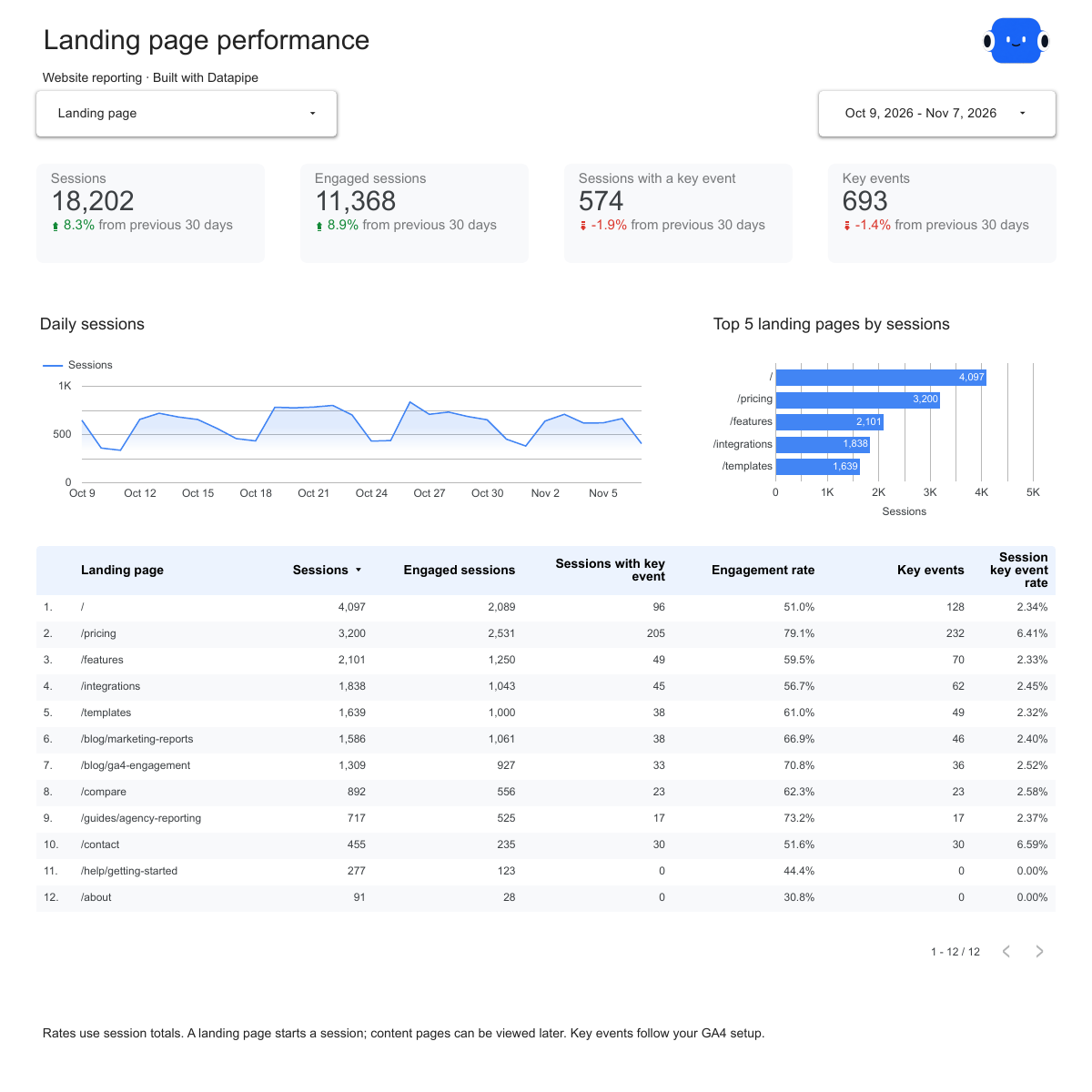
The Landing pages page shows sessions, engaged sessions and sessions with a key event for every entry page. Find the pages your ads send people to. A landing page with plenty of sessions and almost no sessions with a key event is losing the visitors your ads paid for.
Step 6: Send both reports behind one link
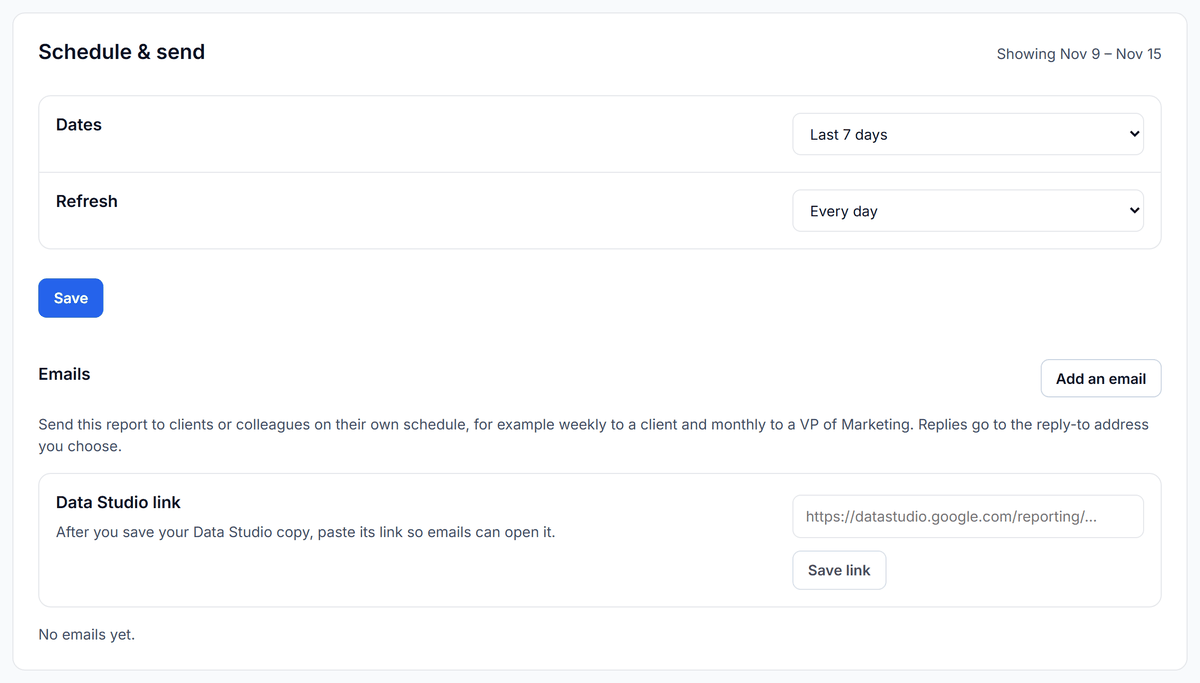
On the Meta Ads report's page in Datapipe, use Add another report to add the GA4 report. It shows below the Meta report with the same dates and goes out in the same public link and email. Then set the refresh in Schedule & send: Free and Starter refresh daily, Pro hourly, and Agency every 15 minutes on up to 50 data sources, as listed on the Datapipe pricing page.
Which Facebook Ads and GA4 metrics belong together
Pair a Meta metric with a GA4 metric only when both describe the same ads over the same complete days. These pairs answer real questions.
| Facebook Ads metric | GA4 metric | What the pair tells you |
|---|---|---|
| Link clicks | Sessions tagged with the ad | How many taps became a visit GA4 could record |
| Landing page views | Sessions tagged with the ad | Whether your UTM tags survive the trip; these two should sit close together |
| Spend | Engaged sessions | Cost per engaged visit, a quality check Meta can't give you |
| Spend | Key events from the ad's sessions | Cost per lead or sign-up as your own site records it |
| Website purchases and purchase value | Purchases and revenue from the ad's sessions | Two views of the same sales, shown side by side and never added |
And these pairs look natural in a dashboard but mislead.
| Tempting combination | Why it misleads | Use this instead |
|---|---|---|
| Meta purchases plus GA4 purchases | The same sale gets counted by both tools | Show them side by side, labelled |
| Reach added across days or campaigns | Reach counts unique people within its own period | Request reach for the whole period as one row |
| All clicks compared with sessions | All clicks include likes, profile taps and "see more" taps that never leave Meta | Link clicks or landing page views |
| GA4 key events divided by Meta link clicks | Numerator and denominator come from different tools | GA4 key events divided by GA4 sessions for the same ad |
| Meta ROAS next to "GA4 ROAS" as if they agree | Meta uses its own click and view windows; GA4 credits the session's source | Show both, each labelled with the tool that produced it |
How to find and fix the gap between Facebook and GA4
A gap between Meta's link clicks and GA4's sessions is normal: a link click counts a tap whether or not the page loads, one person can tap twice, and visitors who decline analytics cookies may not be recorded. What matters is where the gap sits, and three numbers per ad tell you.
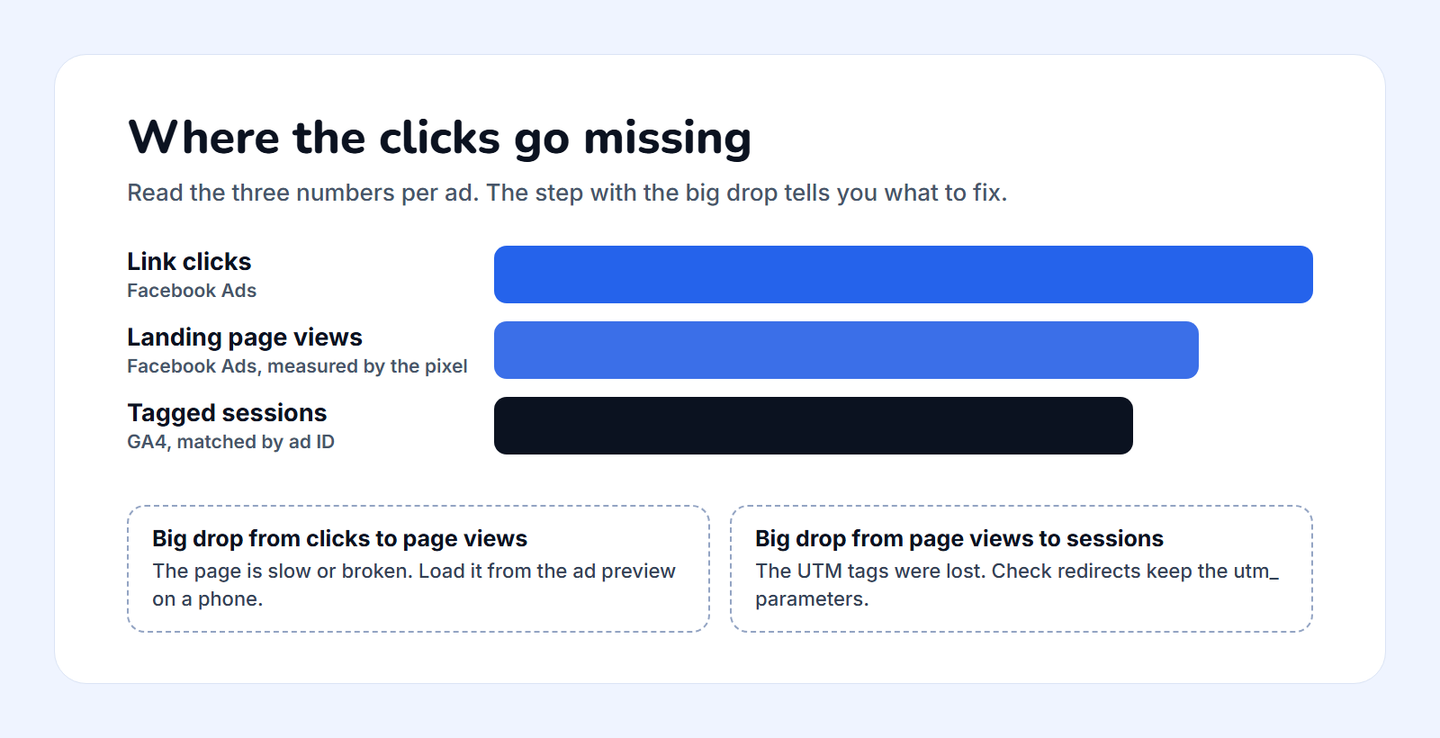
For example, say Meta reports 4,180 link clicks across five ads over two weeks, and GA4 shows 2,409 sessions tagged with those ads. Put link clicks, Meta's landing page views and tagged GA4 sessions side by side for each ad. Three of the ads keep most of their clicks all the way to a tagged session. Normal. That gap needs one sentence in the client report and nothing else. One ad has landing page views but zero tagged sessions, while GA4 shows Facebook referral sessions from m.facebook.com and l.facebook.com landing on that ad's page: the tags were stripped on the way. The last ad has far fewer landing page views than link clicks. People tapped, waited, and left before the page loaded.
The use case to explain Facebook Ads clicks vs GA4 sessions to a client runs exactly this check with ChatGPT or Claude: it reads link clicks and landing page views per ad, matches GA4 sessions by ad ID, lists untagged Facebook referral sessions on each ad's page, and drafts the note for the client.
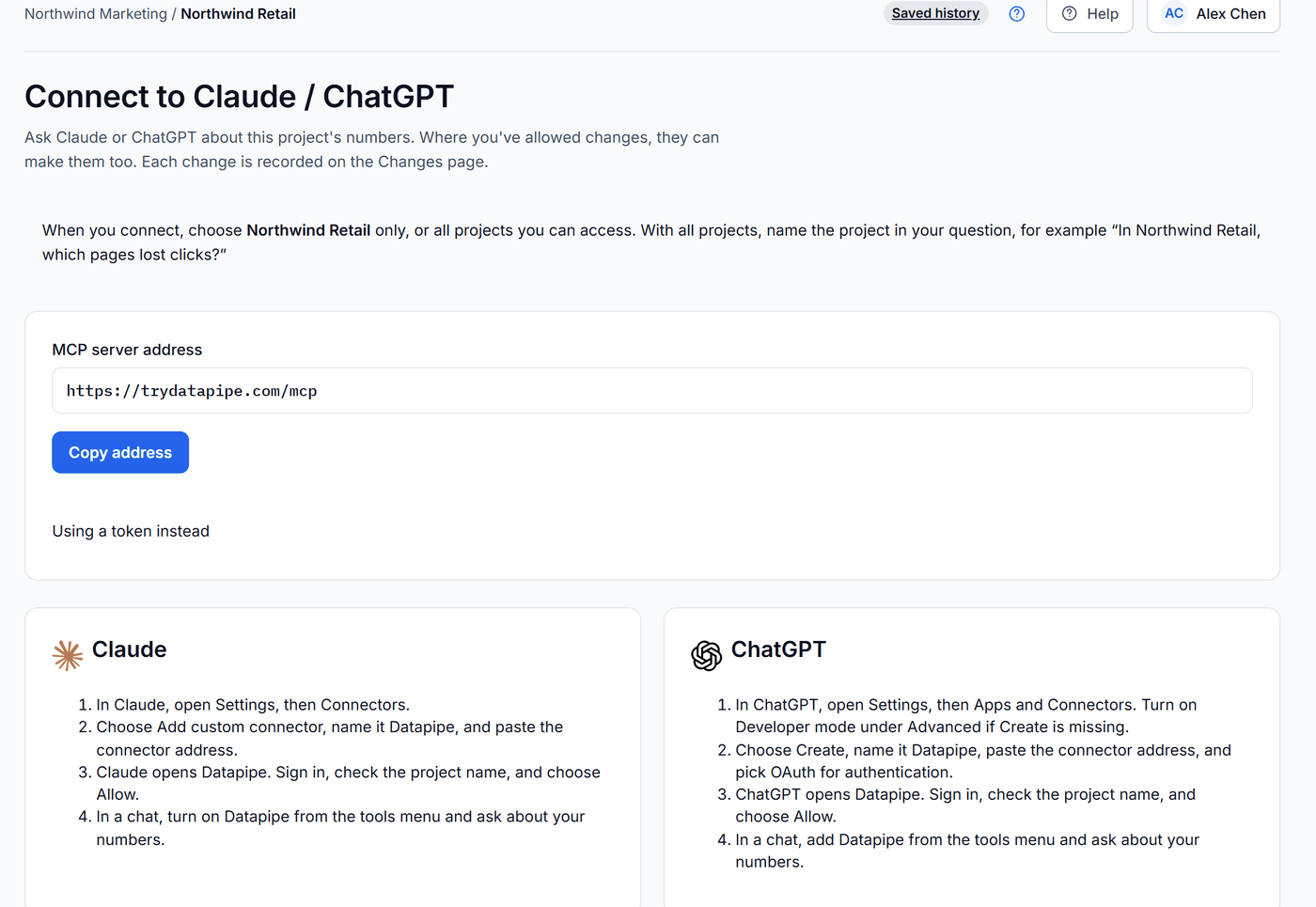
To run the check yourself, open Settings in Datapipe, then Claude / ChatGPT, and copy the connector address. Add it as a connector named Datapipe in Claude or ChatGPT, sign in and choose Allow. Once Meta Ads is connected, paste this:
In [project name], read Meta Ads link clicks by ad ID for the last 14 complete days, plus landing page views if the account reports them. Read GA4 sessions by sessionManualAdContent and sessionSourceMedium for the same dates. Match each ad ID to the sessions whose utm_content holds that ID. Show one row per ad with link clicks, landing page views and sessions, then list the ads with no matching sessions. Don't change anything.
Troubleshooting
If an ad has landing page views but no tagged GA4 sessions, its tags are being lost. Open the ad's URL from Ads Manager, follow any redirect, and check the final address still carries utm_source, utm_medium, utm_campaign and utm_content. Fix the redirect or point the ad at the final URL, then compare the next seven complete days. That's usually the whole fix.
If landing page views are far below link clicks, the page is slow or broken, usually on phones. Open the page from the ad preview on a phone and time it. Hold the budget where it is until the page loads properly. More spend only buys more clicks that never arrive.
If GA4 shows facebook / paid_social and also fb / cpc, some ads use different tags. GA4 treats them as two different sources. Fix the URL parameters on the odd ads so every ad uses the same pair.
If renamed ads stopped matching, the tags use the ad name. Switch utm_content to {{ad.id}}. Done.
If daily charts drift apart by a day, the ad account and the GA4 property use different time zones. Check the ad account's time zone in Ads Manager's ad account settings and the property's under Admin, Property details, and compare complete days only.
If Meta reports far more purchases than GA4, that's expected up to a point: Datapipe requests a fixed 7-day click and 1-day view attribution window, so Meta counts people who saw the ad and bought later without clicking, while GA4 credits the purchase to the session it happened in. When the gap looks too big to explain, the use case to compare Facebook Ads, GA4 and Shopify performance lines Meta's attributed purchases up with the tagged GA4 sessions and the store's own orders.
If the latest days look low in Meta, Meta is still attributing purchases to recent clicks. Wait. End every comparison yesterday and expect the last week to rise.
Which number should the client see?
Use Meta for what the ad delivered. Use GA4 for what happened on the site. Spend, reach, frequency and link clicks are Meta's; sessions, engagement, key events and on-site revenue are GA4's. For purchases, show both. Label each.
Here's the stance worth defending, even when a client asks for one simple number: a single ROAS figure on the cover page without the tool's name beside it does more harm than good. The first client who opens GA4 and finds a lower number stops trusting the whole report. Two labelled numbers start a better conversation than one blended number nobody can reproduce.
When the budget question comes up, the use case to review ad budget pacing with Facebook Ads, GA4 and Sheets compares Facebook Ads spend with the plan in your Google Sheet and adds tagged GA4 engagement before anyone changes a campaign.
What this setup won't do
Two reports behind one link aren't one blended table. Datapipe doesn't merge Meta and GA4 rows for you, because the join depends on your tagging, and a silent mismatch is worse than a visible one. The ad-by-ad match happens in the use case, where unmatched rows stay visible.
Purchase results use the fixed 7-day click and 1-day view window, not each ad set's own attribution setting, so totals can differ from an Ads Manager view set to another window. Website purchases and omni purchases stay separate fields, never extra sales to add together. And GA4 still won't pull Meta's spend on its own: cost per engaged session and cost per key event only exist in a report that reads both accounts.
Frequently asked questions
Why does Facebook Ads show more clicks than GA4 shows sessions?
A link click counts a tap whether or not the page loads, one person can tap twice in one visit, and visitors who decline analytics cookies may not be recorded by GA4. Some gap is normal.
Compare link clicks, Meta's landing page views and tagged GA4 sessions for each ad. Landing page views with no tagged sessions mean the UTM tags were lost; landing page views far below clicks mean the page is slow.
What UTM parameters should I use for Facebook ads?
Use the same source and medium on every ad and put the ad ID in utm_content: utm_source=facebook&utm_medium=paid_social&utm_campaign={{campaign.name}}&utm_content={{ad.id}}. In Ads Manager, paste it into URL parameters under Tracking. The ad ID lets you match each ad to its GA4 sessions; ad names change, IDs don't.
Why does Facebook report more purchases than GA4?
Meta counts purchases inside its attribution window, including people who saw the ad and bought later without clicking. Datapipe requests a fixed 7-day click and 1-day view window. GA4 credits a purchase to the session it happened in. Show both numbers, each labelled with the tool that counted it, and never add them together.
Can I see Facebook Ads spend in GA4?
Not on its own: GA4 doesn't pull Meta spend automatically. A report that reads both accounts, such as Facebook Ads and GA4 in one Datapipe project, lets you compare spend with GA4 engaged sessions and key events.
Is there a free Facebook Ads and GA4 report template for Looker Studio?
Yes. Datapipe's Meta Ads ROAS report template and GA4 traffic acquisition report template are free Data Studio templates. Copy both, connect the two accounts in Datapipe, and use Add another report to send them behind one link.
Put your marketing numbers on autopilot
Datapipe connects your data sources and keeps your reports refreshed on a schedule.
Start free