7 best backlink checkers for client reports, with dashboards and templates
The 7 best backlink checkers for agencies, with each tool's dashboard and the exact steps to turn new and lost links into a client report that refreshes on its own.

The best backlink checker for a client report is DataForSEO if you want new and lost links every day next to up to three competitors, Semrush if your team already pays for it, and Moz if your clients already ask about Domain Authority. For link research rather than reporting, Ahrefs and Majestic are the strongest tools, but neither connects to Datapipe yet.
This guide shows each tool's own dashboard, what it does well and badly, and the exact steps to turn its numbers into a Data Studio report your client can open. Three of the seven tools have a free backlink report template that does the layout for you.
| Tool | Best for | How it's priced | Client report template |
|---|---|---|---|
| DataForSEO | Daily new and lost links next to competitors | Pay as you go, per request | Yes |
| Semrush | Teams already paying for Semrush | Subscription; API needs a plan with API units | Yes |
| Moz | Clients who track Domain Authority | Moz API is its own subscription | Yes |
| Ahrefs | Link research and competitor gaps | Subscription | Not in Datapipe yet |
| Majestic | Judging link quality with Trust Flow | Subscription | Not in Datapipe yet |
| SE Ranking | Backlinks inside an all-in-one SEO tool | Subscription; free trial | No (rankings and audits only) |
| Google Search Console | A free list of links Google found | Free | No (the Links report has no API) |
What you'll need before you start
You need a backlink tool account that hands its data to other tools, a Datapipe account and a Google account.
The API is the part people miss. Semrush needs a plan that includes API units, such as SEO Business. Moz sells its API separately from Moz Pro, so a Moz Pro login alone won't connect. DataForSEO sells API access and charges each request to your balance. Check this before you buy.
The Datapipe Free plan includes 3 data sources with a daily refresh, which covers one client's backlink tool plus their Search Console property.
How we compared them
We judged each tool on what a monthly client report actually needs: does it show which referring domains you gained and lost, how much does it cost to read the data automatically, how does it score authority, and can its numbers reach a client report without someone exporting a CSV every month?
The last question decides your Mondays. A tool with a great index and no way out except screenshots costs you an hour per client per report. Every tool below says plainly whether its data reaches a Datapipe report, and for the three that do, we show the setup step by step.
1. DataForSEO
The best choice for client reports that show what changed and how the client compares.
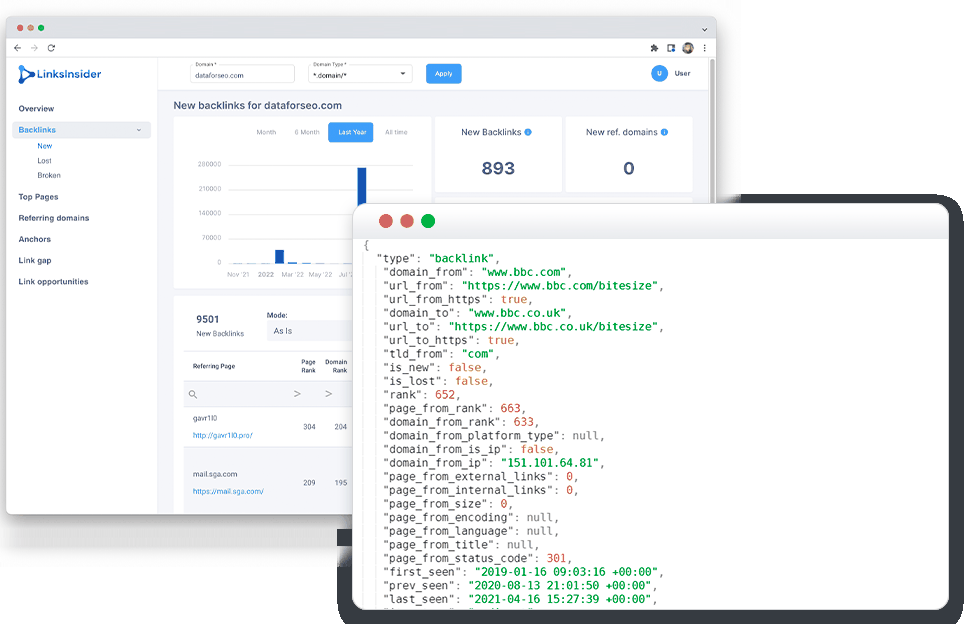
DataForSEO sells search data by the request, pay as you go, with no monthly subscription. You get the raw backlink data and decide how to show it, which is exactly what a reporting tool wants.
Where it's strong. New and lost referring domains by day. Most tools show you a total; DataForSEO tells you which day a site started or stopped linking. That's the number a client asks about when their link building invoice arrives. You can also put up to three competitor domains next to the client's.
Where it falls short. It's built for developers, so browsing a new client's links is slower than in Ahrefs or Majestic. Every refresh costs money from your balance, so read the request count before you add competitors.
Set up the client report.
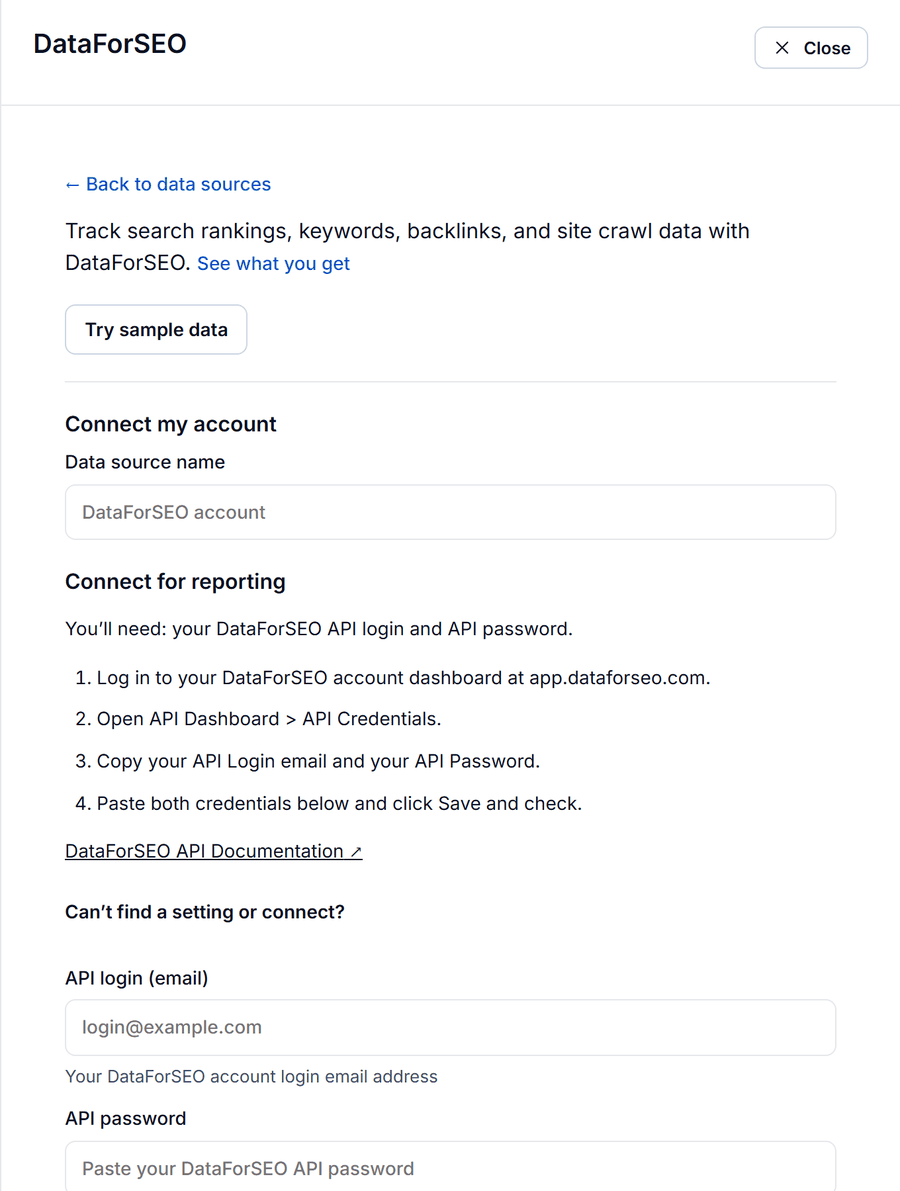
- In DataForSEO, open API Dashboard, then API Credentials. Copy your API login (your account email) and your API password.
- In Datapipe, open Data sources, choose Add data source, pick the DataForSEO data source and paste both. Click Save and check.
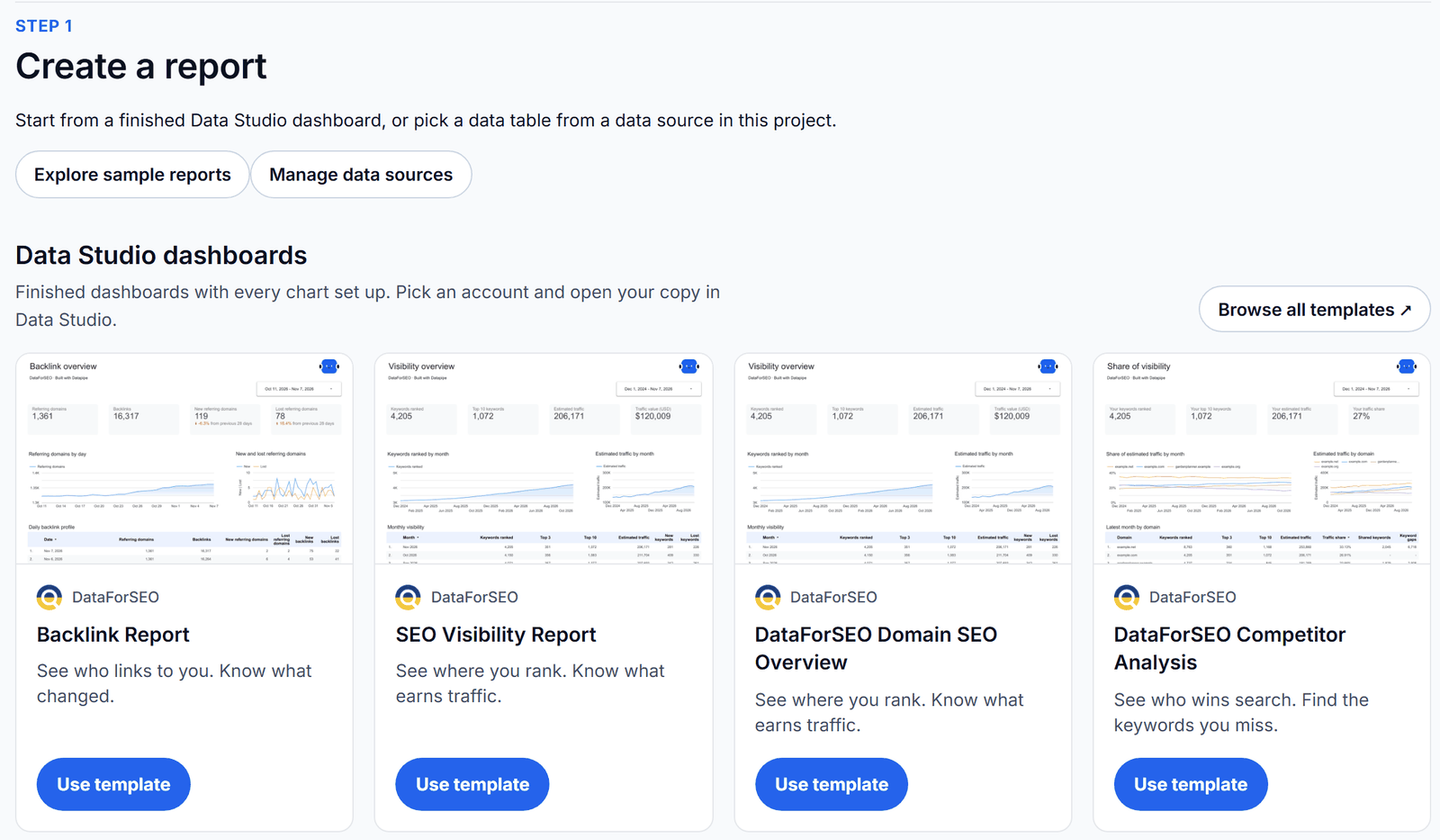
- Open Reports. Under Data Studio dashboards, find DataForSEO Backlink Report and click Use template.
- Choose the DataForSEO account, type the client's domain and up to three competitor domains, one per line. The screen tells you how many requests each refresh makes before you commit.
- Click Open my dashboard and save your copy in Data Studio.
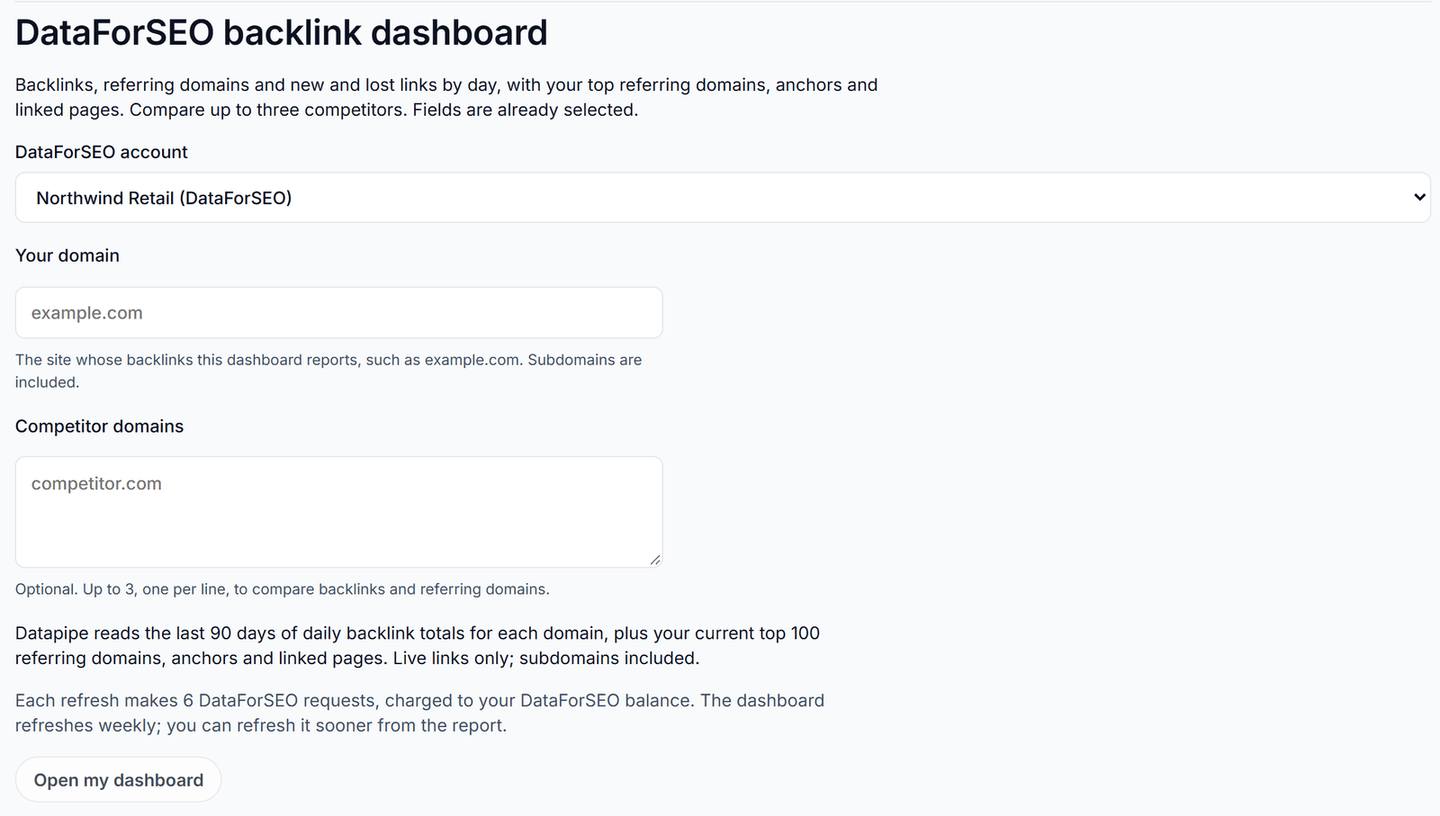
Each refresh makes 6 DataForSEO requests for one domain, or 15 with three competitors. The dashboard refreshes weekly by default; you can change that or refresh sooner from the report.
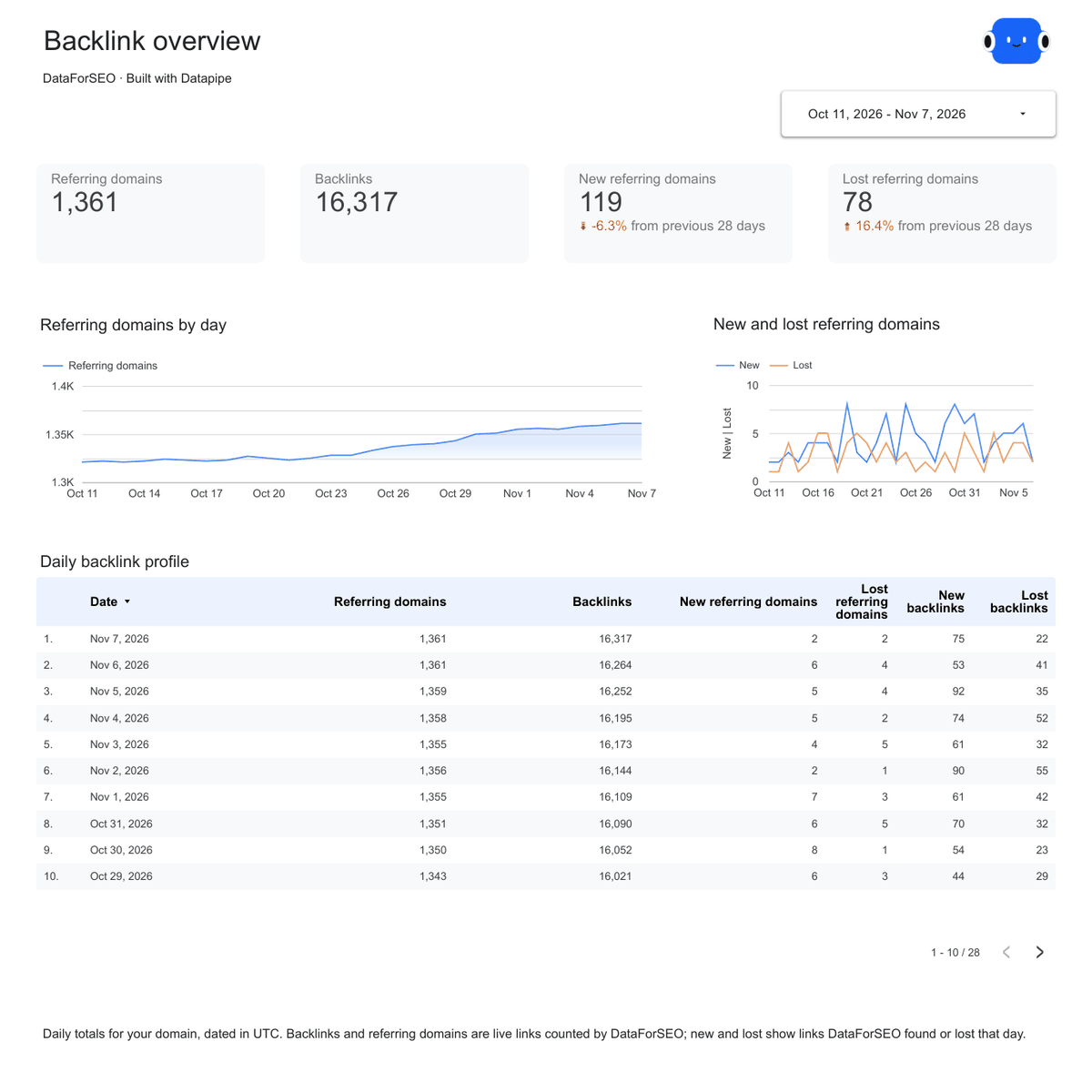
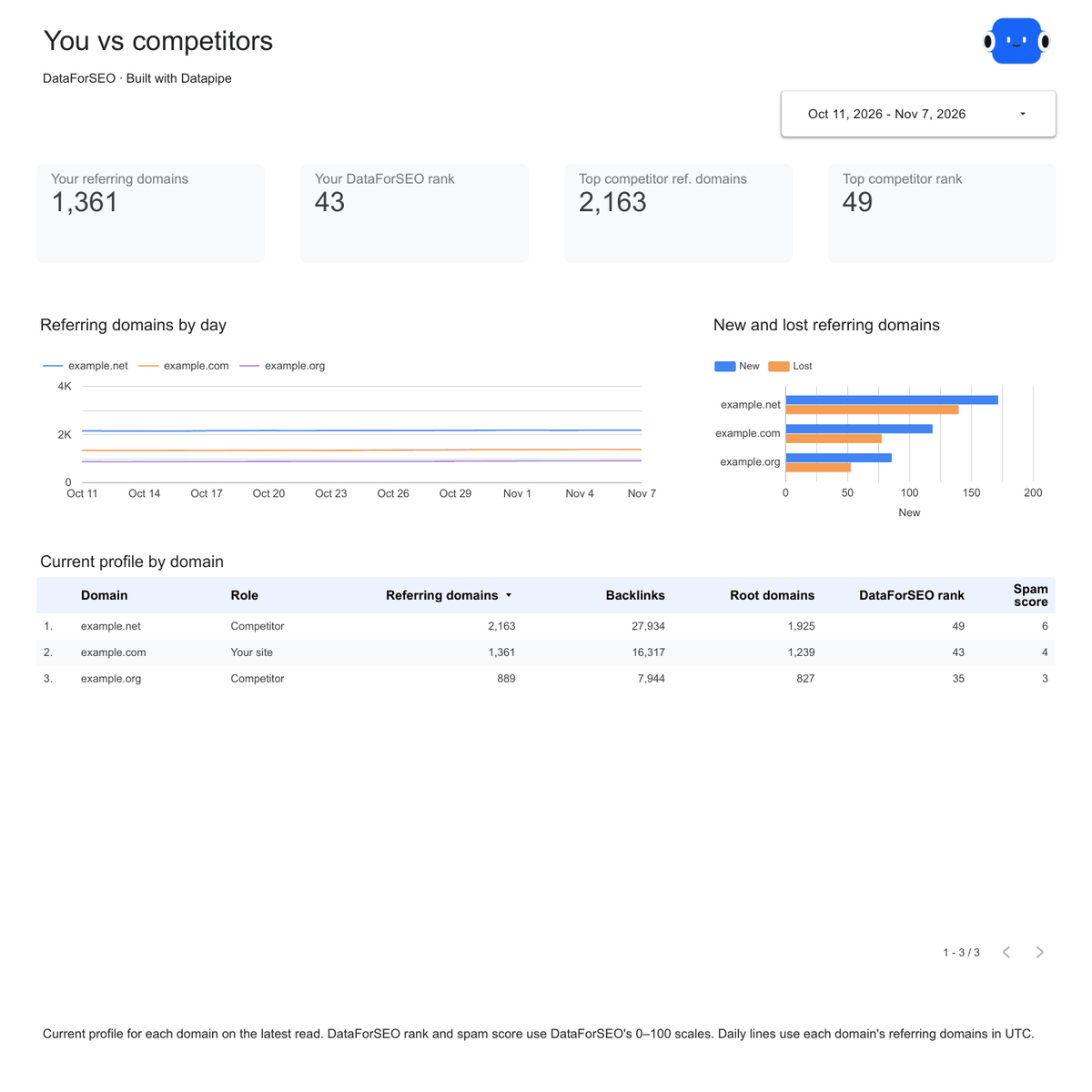
The Overview page of the DataForSEO backlink report template is the page to open first. It shows referring domains and backlinks for each of the last 90 days, opens on the last 28, and compares new and lost referring domains with the 28 days before. The Competitors page puts the client's referring domains, backlinks and DataForSEO rank next to each competitor. Referring domains lists the top 100 referring domains by DataForSEO rank with your most-used anchors, and Top pages shows which pages on the client's site attract the most links.
2. Semrush
The pick if your team already works in Semrush and wants its Authority Score in the report.
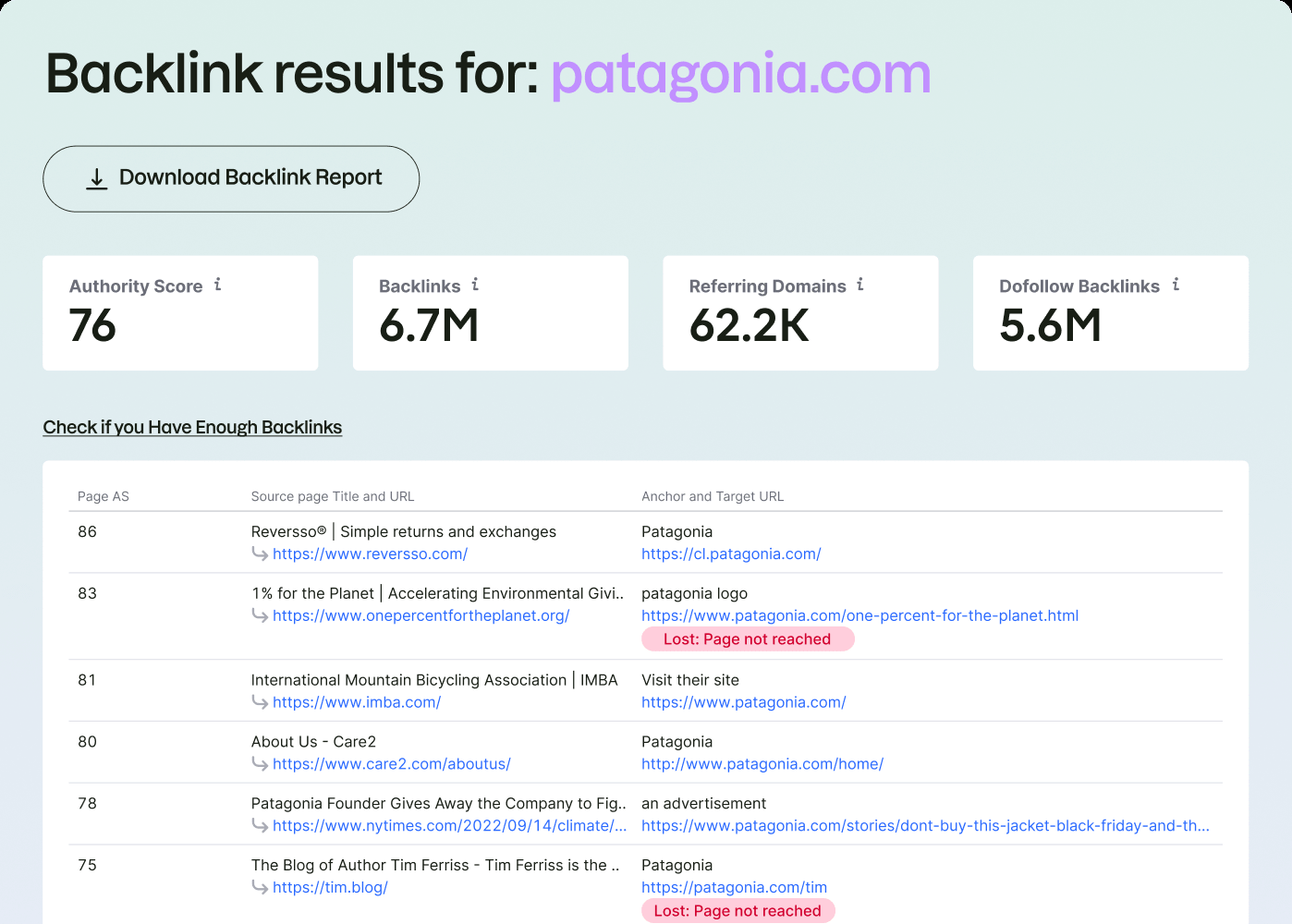
Semrush puts backlinks next to keyword research, site audits and ads data in one subscription. Its free backlink checker shows a site's top backlinks with Authority Score, total backlinks and referring domains, and flags links Semrush has seen go missing.
Where it's strong. Authority Score is the number many clients have already seen in a pitch deck, so it needs no explaining. The referring domains list carries each domain's country and the dates Semrush first and last saw the link, which makes a lost-link conversation quick.
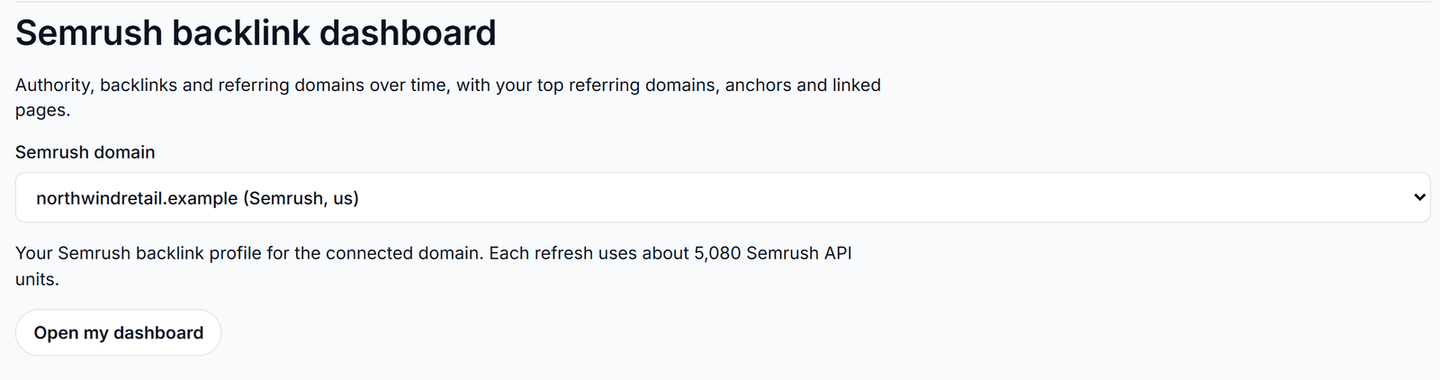
Where it falls short. API units. Each refresh of the Semrush backlink dashboard uses about 5,080 units, so it refreshes weekly, not daily. Position Tracking and Site Audit projects aren't part of the Semrush data source in Datapipe either. Semrush reports history by week for about six months; DataForSEO's daily new-and-lost view has no Semrush equivalent here.
Set up the client report.
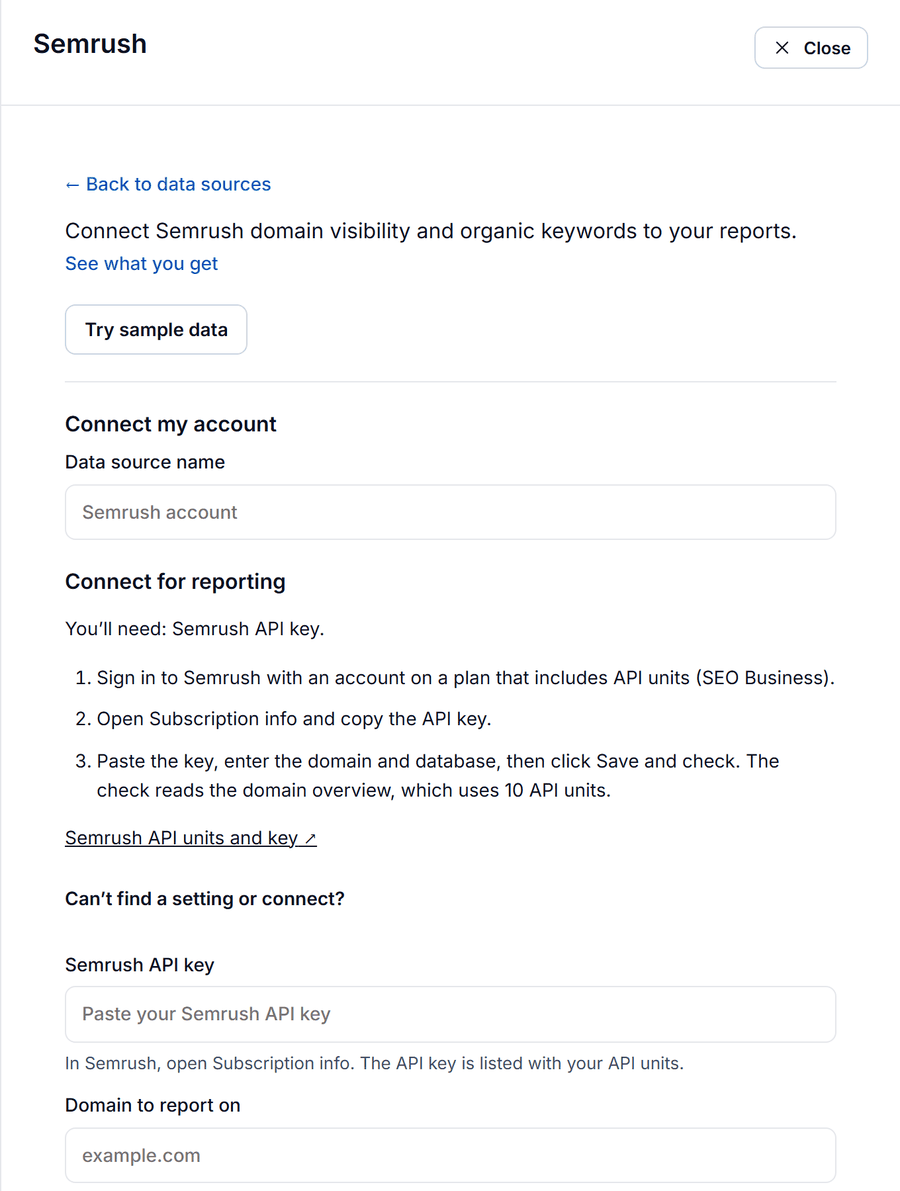
- In Semrush, open Subscription info and copy the API key listed with your API units.
- In Datapipe, open Data sources, choose Add data source and pick the Semrush data source. Paste the key, enter the client's domain without https:// and the regional database (us, uk, de and so on), then click Save and check. The check uses 10 API units.
- Open Reports, find Semrush Backlinks under Data Studio dashboards and click Use template.
- Choose the domain and click Open my dashboard, then save your copy in Data Studio.
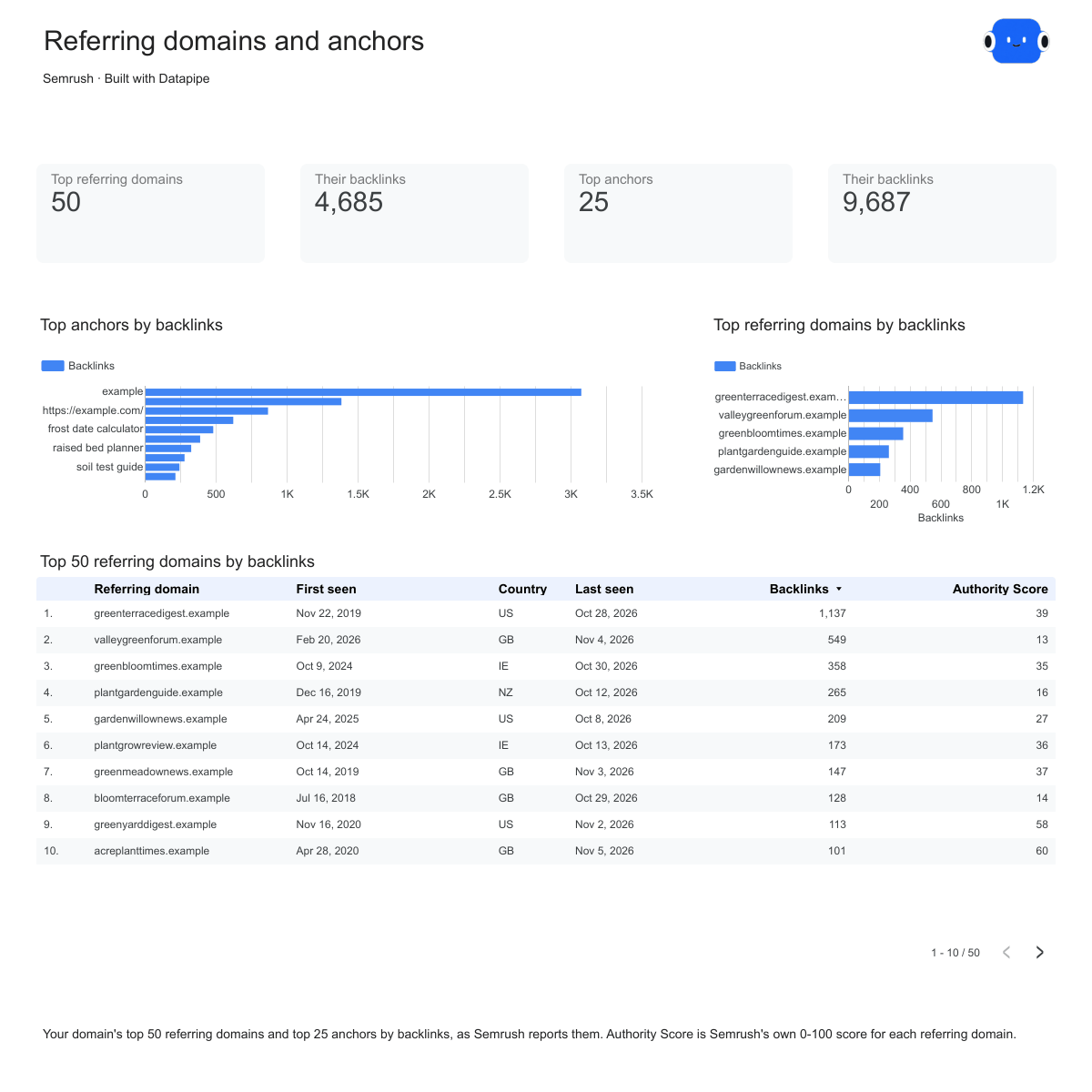
The Semrush backlink report template has an Overview page with Authority Score, backlinks, referring domains and follow links, plus backlinks and referring domains by week. The Referring domains page, above, lists the top 50 referring domains with Authority Score, country and first and last seen dates, beside the top 25 anchors. Top pages shows the 25 most-linked pages on the client's site with their HTTP status, so a lost link pointing at a page that now returns 404 jumps out.
3. Moz
The pick for clients who measure progress in Domain Authority.
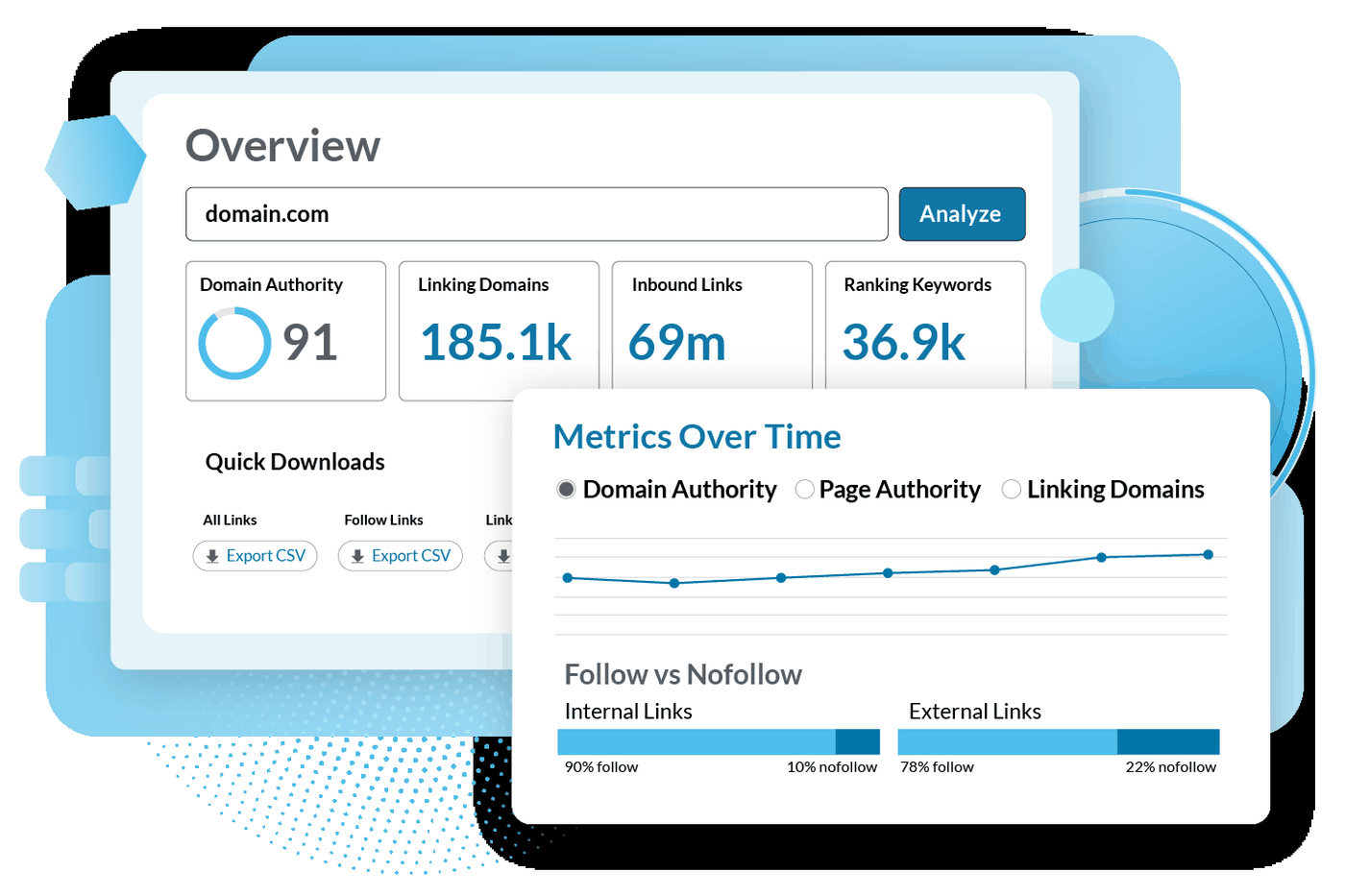
Moz invented Domain Authority, and many clients still track it. Link Explorer, its backlink tool, shows Domain Authority, Spam Score and recently discovered and lost linking domains. A free Moz Community account gets 10 queries a month.
Where it's strong. Spam Score next to Domain Authority gives you a quick quality check on a client's profile. The monthly history of linking domains and Domain Authority makes a clean year-over-year chart.
Where it falls short. Moz counts linking pages and linking root domains, not individual links, so its totals look smaller than other tools'. It doesn't report first-seen dates for anchors. The API is a separate subscription from Moz Pro, and each read uses rows from your Moz API quota.
Set up the client report.
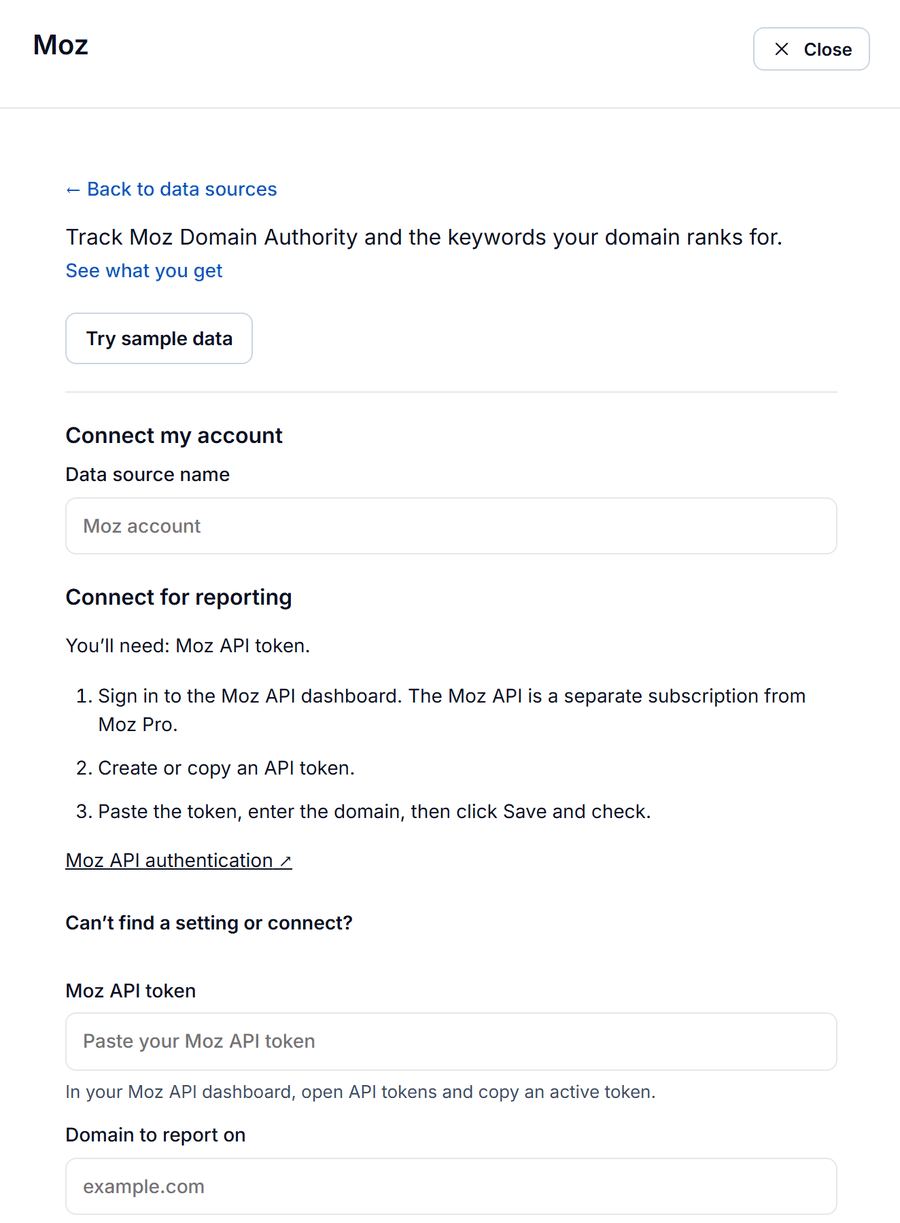
- Sign in to the Moz API dashboard, open API tokens and copy an active token.
- In Datapipe, open Data sources, choose Add data source and pick the Moz data source. Paste the token and the client's domain, then click Save and check.
- Open Reports, find Moz Backlinks and click Use template. Choose the domain, click Open my dashboard and save your copy in Data Studio.
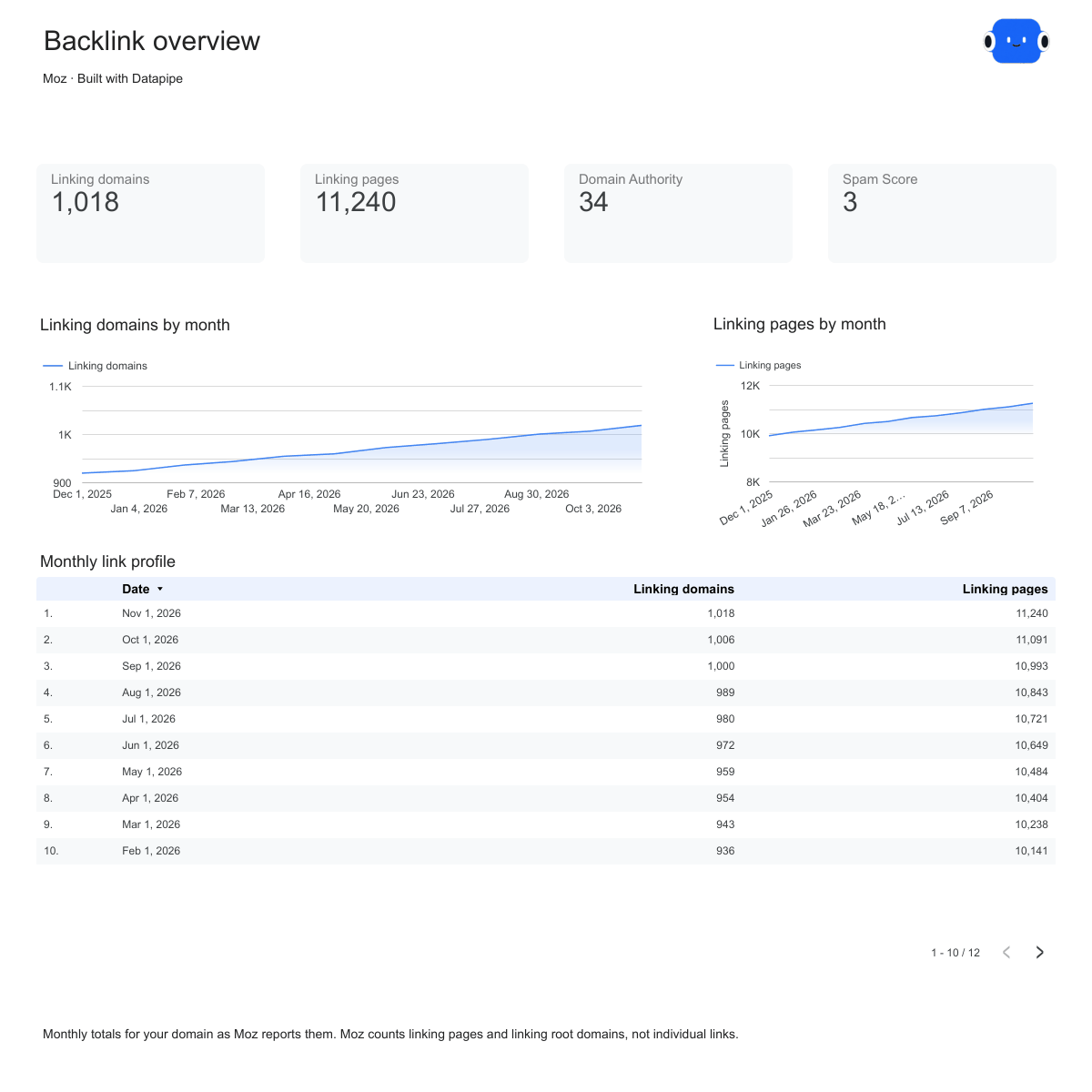
The Moz backlink report template opens on the Overview page above: Domain Authority, linking pages, linking domains and Spam Score, with linking domains and linking pages by month. Linking domains shows the top 50 linking domains by Domain Authority and the top 25 anchors. Top pages lists the client's 25 strongest pages by Page Authority. Like the Semrush version, it refreshes weekly.
4. Ahrefs
The strongest tool for link research, and not in Datapipe yet.
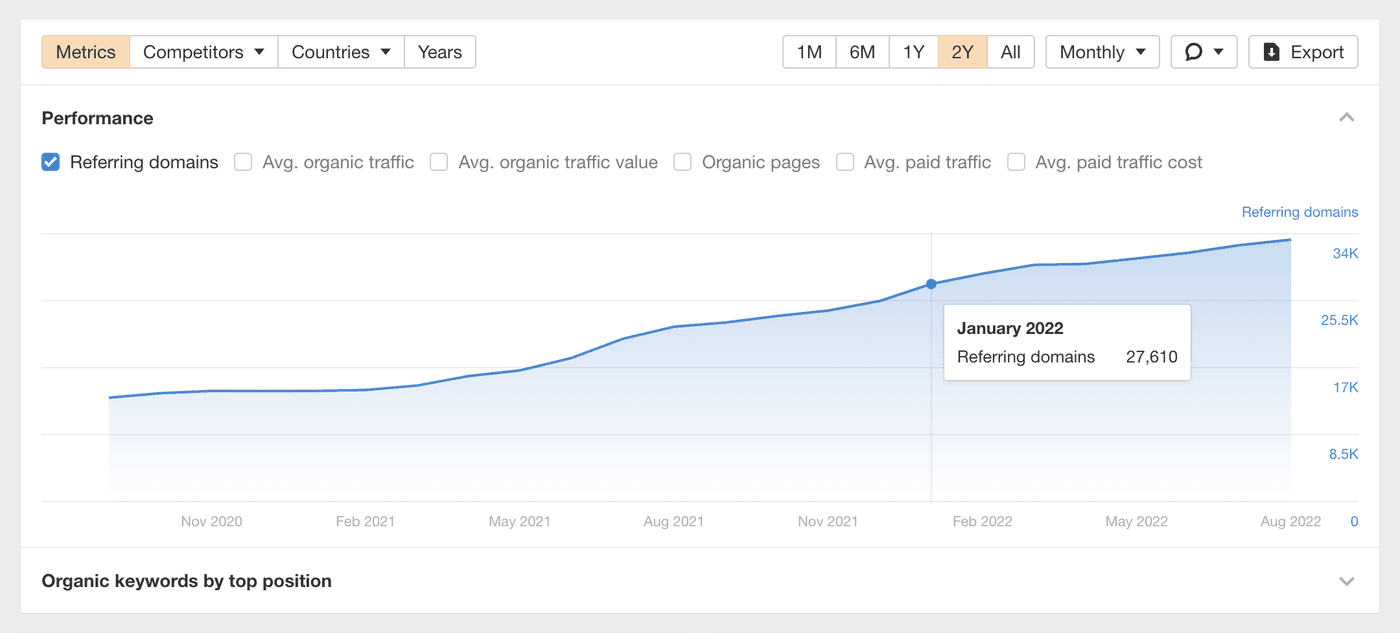
Ahrefs is where many SEOs go first to see who links to a site. Ahrefs says its backlink index updates with fresh data every 15 minutes, and its Domain Rating has become a common shorthand for a site's link strength. The free version of its Backlink Checker gives a limited look; the full reports need a paid plan.
Where it's strong. Research. The Backlinks report lists every page linking to a site, with filters to narrow it down, and you can add spammy links to a disavow file straight from the Backlink Checker.
Where it falls short for client reports. Ahrefs isn't a Datapipe data source yet, so its numbers can't refresh a Datapipe report. If you research in Ahrefs, report from one of the three tools above. Keep each report on one tool, though: Domain Rating and Authority Score measure different things, so don't put them in the same chart.
5. Majestic
The pick for judging link quality, and not in Datapipe yet.

Majestic scores links with two numbers: Trust Flow for link quality and Citation Flow for link volume. A page with a higher Trust Flow than Citation Flow usually has better links. Topical Trust Flow places a site in more than 800 categories, which helps when you vet a site for outreach.
Where it's strong. Two indexes. The Fresh Index covers links found in the last 120 days, including ones that were deleted or lost. The Historic Index goes back to 2006, so you can see what a domain looked like before a client bought it.
Where it falls short for client reports. Majestic isn't a Datapipe data source yet. Its flow metrics also take more explaining to a client than a single authority number does.
6. SE Ranking
A solid backlink checker inside an all-in-one tool, but its backlinks don't reach Datapipe.
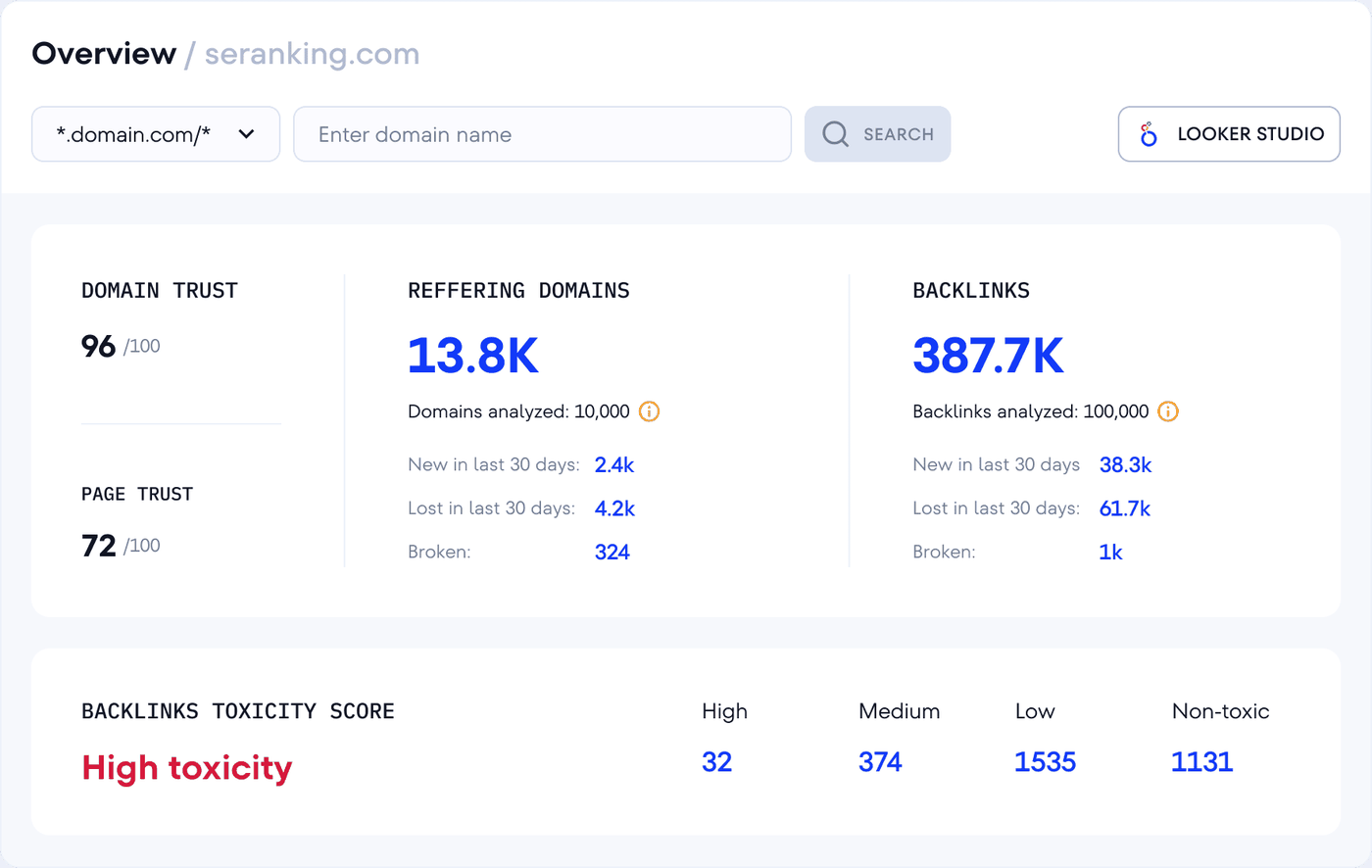
SE Ranking shows Domain Trust, referring domains and backlinks with new and lost counts for the last 30 days, plus a backlink toxicity score. Its backlink checker gives a few free checks a day before you need a trial.
Where it's strong. Value. If you already use SE Ranking for rankings and audits, its backlink tool comes in the same subscription.
Where it falls short for client reports. The SE Ranking data source in Datapipe covers rank tracking and site audits, not backlinks. You can report SE Ranking positions automatically, but the backlink numbers stay in SE Ranking. Our guide to the best rank tracking tools for agencies covers the rankings side.
7. Google Search Console
Free, from Google, and only for sites you own.
Search Console's Links report lists the links Google has found to a site you've verified. It shows Top linked pages, Top linking sites and Top linking text, and you can export up to 100,000 of the latest links. Google's own guide to the Links report says the report is a sample, and that some links may already be gone.
Where it's strong. It's free, and it's Google's view rather than a third-party crawler's. Use it to check that an important link you built has been found.
Where it falls short. No dates for new or lost links, no authority score, and no competitors. The Links report also isn't part of Search Console's API, so the Google Search Console data source in Datapipe reports searches and pages, not links. For a client report, pair Search Console's clicks with one of the backlink templates above.
What to put in a client backlink report
A client backlink report should lead with referring domains gained and lost, then show who links and to which pages. Raw backlink totals and authority scores come second.
| Metric | Put it in the report? | Why |
|---|---|---|
| Referring domains | Yes, as the headline | One site linking 2,000 times is still one site. Domains track real reach. |
| New and lost referring domains | Yes, next to the headline | It's the change the client paid for, and losses explain a flat month. |
| Total backlinks | As a secondary number | Sitewide footer links inflate it overnight. |
| The tool's own authority score | As a trend only | Each tool scores differently. Compare the same tool month to month. |
| Top anchors | Yes, as a table | A sudden spike in exact-match anchors is worth a question. |
| Spam score | For your team, not the headline | It's an estimate, and clients read it as an alarm. |
Some pairs look useful and mislead. Don't add daily backlink totals together across a month: each day is a total, so summing 28 days counts the same links 28 times. The templates show each day's total for that reason, while new and lost links are counted per day and do add up. Don't average Domain Authority with Authority Score or DataForSEO rank either. And don't compare a Moz linking-domains count with a Semrush referring-domains count and call the gap progress: the tools crawl different parts of the web.
For example, say the client's DataForSEO report shows 119 new and 78 lost referring domains over the last 28 days. That's a net gain of 41 sites. If the client asks why the total barely moved in a week, the lost line answers it: open Top pages and check whether the lost links pointed to pages that were removed or redirected. A page that now returns an error is a link you can often win back by asking the site owner to update the URL.
How to send the report every month
Set the schedule once on the report's page in Datapipe, and the client gets the same link every time.
- In Reports, open the backlink report you saved.
- Use Add another report to put the client's Search Console report below it, so links and clicks arrive together.
- In Schedule & send, pick the dates, set the refresh, and add the client's email.
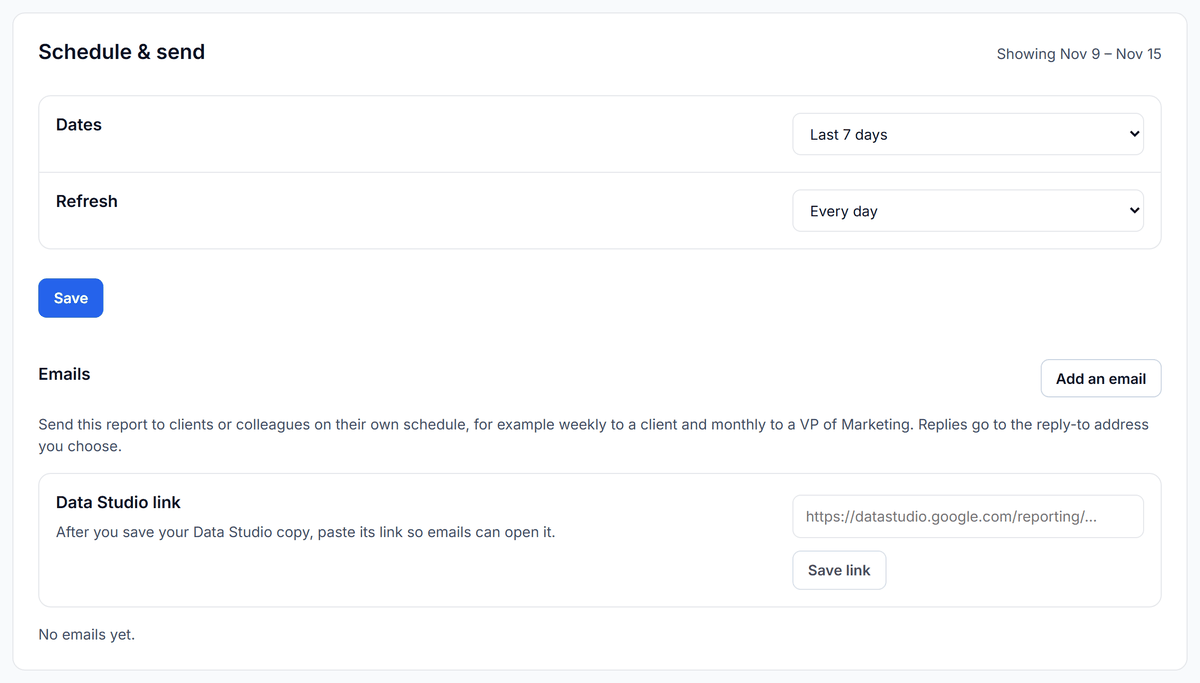
Free and Starter refresh daily, Pro hourly, and Agency every 15 minutes on up to 50 data sources, as listed on the Datapipe pricing page. The backlink dashboards themselves refresh weekly by default, because each refresh spends your backlink tool's API units or balance.
Ask Claude or ChatGPT about the client's links
Connect the project to Claude or ChatGPT once, and the assistant reads the same backlink accounts your templates use. It sees only the project you allow, and every read it makes is listed in Team & access, under Activity.
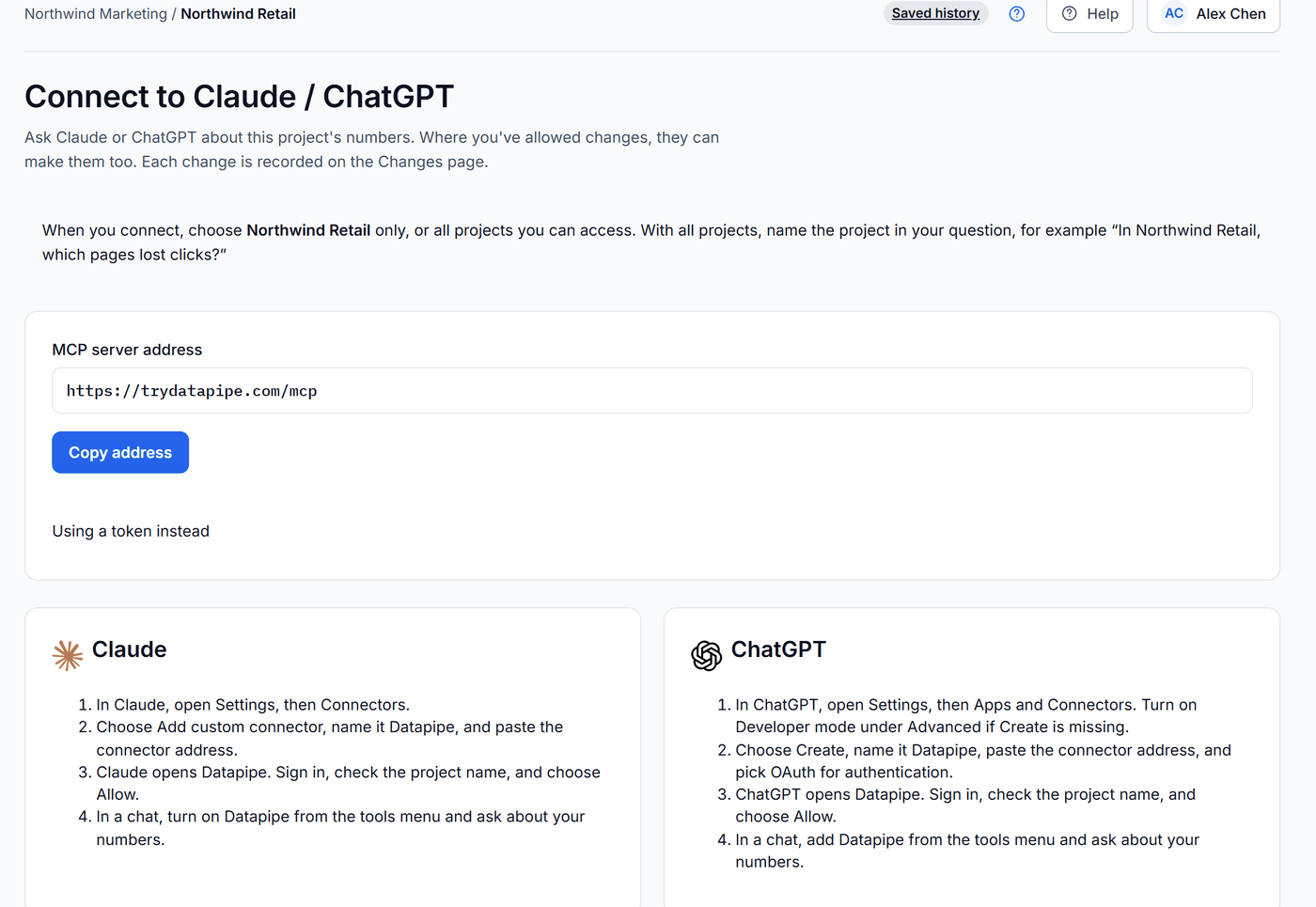
- In Datapipe, open Settings, then Claude / ChatGPT, and click Copy address.
- In Claude, open Settings, then Connectors, choose Add custom connector, name it Datapipe and paste the address. In ChatGPT, open Settings, then Apps and Connectors, choose Create, name it Datapipe, paste the address and pick OAuth. No Create button? Turn on Developer mode under Advanced.
- Datapipe opens. Sign in, check the project name and choose Allow.
- Start a chat, turn on Datapipe from the tools menu and paste one of the prompts below. Swap in your project and domain names.
Size up the competitors.
In [project name], read the current DataForSEO backlink summary for [client domain], [competitor 1] and [competitor 2]: referring domains, backlinks, dofollow and nofollow backlinks, DataForSEO rank and spam score. Put the three domains in one table, sorted by referring domains, and tell me how many referring domains the client is behind the leader. Don't change anything.
Explain the scores to the client.
In [project name], read Semrush's backlinks overview (Authority Score, backlinks, referring domains) and Moz's domain metrics (Domain Authority, linking root domains, Spam Score) for [client domain]. Show each tool in its own column, named by tool, and don't average or compare the authority scores across tools. Then write three plain sentences for the client explaining what each number measures. Don't change anything.
The assistant reads the current snapshot. For the trend over 28 or 90 days, open the report, because that's where the client looks every month.
Troubleshooting your backlink report
If two tools show very different totals, that's normal. Each tool crawls its own index and counts differently: Moz counts linking pages, Semrush and DataForSEO count individual links. Pick one tool per client and compare it with itself over time.
If the top lists don't add up to the total, that's also expected. The lists hold the top referring domains, anchors and pages only, while the total counts every link the tool found.
If Semrush says the database isn't included, enter a regional database your subscription covers. If Semrush runs out of API units, add units in Semrush before the next refresh.
If Moz reports insufficient quota, add rows to your Moz API plan. A Moz Pro login won't work here; the token must come from the Moz API dashboard.
If DataForSEO fails to connect, check that your account balance is active and that the login email matches your API credentials. Remove a competitor or two if the per-refresh cost is higher than you want.
If a backlink chart looks flat while new links keep arriving, read the lost line beside it. A flat total with steady new links means you're losing links at the same rate, and Top pages usually shows where.
Frequently asked questions
What is the best backlink checker for agencies?
For client reports, DataForSEO, because it shows new and lost referring domains by day next to up to three competitors, and you pay only for the requests you make. If your team already pays for Semrush, use Semrush and its Authority Score. If your clients track Domain Authority, use Moz.
For research on a new client or competitor, Ahrefs and Majestic are stronger, but neither connects to Datapipe yet.
Is there a free backlink checker?
Yes, with limits. Google Search Console's Links report is free for sites you own. A free Moz Community account gets 10 Link Explorer queries a month. Semrush, Ahrefs and SE Ranking each offer a free backlink checker that shows part of a profile.
None of the free versions keep a history you can send to a client every month.
Why do backlink checkers show different numbers?
Each tool crawls its own index of the web and counts links its own way. Moz counts linking pages and linking root domains, while Semrush and DataForSEO count individual links. Authority scores are each tool's own formula too.
Pick one tool per client and compare it with itself over time.
Should I report backlinks or referring domains to clients?
Referring domains. One website can link to a client thousands of times from a footer, which inflates the backlink total without adding reach. Lead with referring domains gained and lost, and show total backlinks as a secondary number.
How often should a backlink report refresh?
Weekly is enough for most clients. Links change slowly, and every refresh spends API units or balance in your backlink tool. Datapipe's Semrush and Moz backlink dashboards refresh weekly, and the DataForSEO dashboard refreshes weekly by default while still showing each day's new and lost links.
Can I put Ahrefs or Majestic data in a Datapipe report?
Not yet. Neither is a Datapipe data source today. You can research in Ahrefs or Majestic and report from DataForSEO, Semrush or Moz, as long as each client's report stays on one tool.
Put your marketing numbers on autopilot
Datapipe connects your data sources and keeps your reports refreshed on a schedule.
Start free