Datapipe
Start free
← All report templates

Moz · Free Data Studio template

Moz backlink report template
See who links to you. Grow the links that matter.

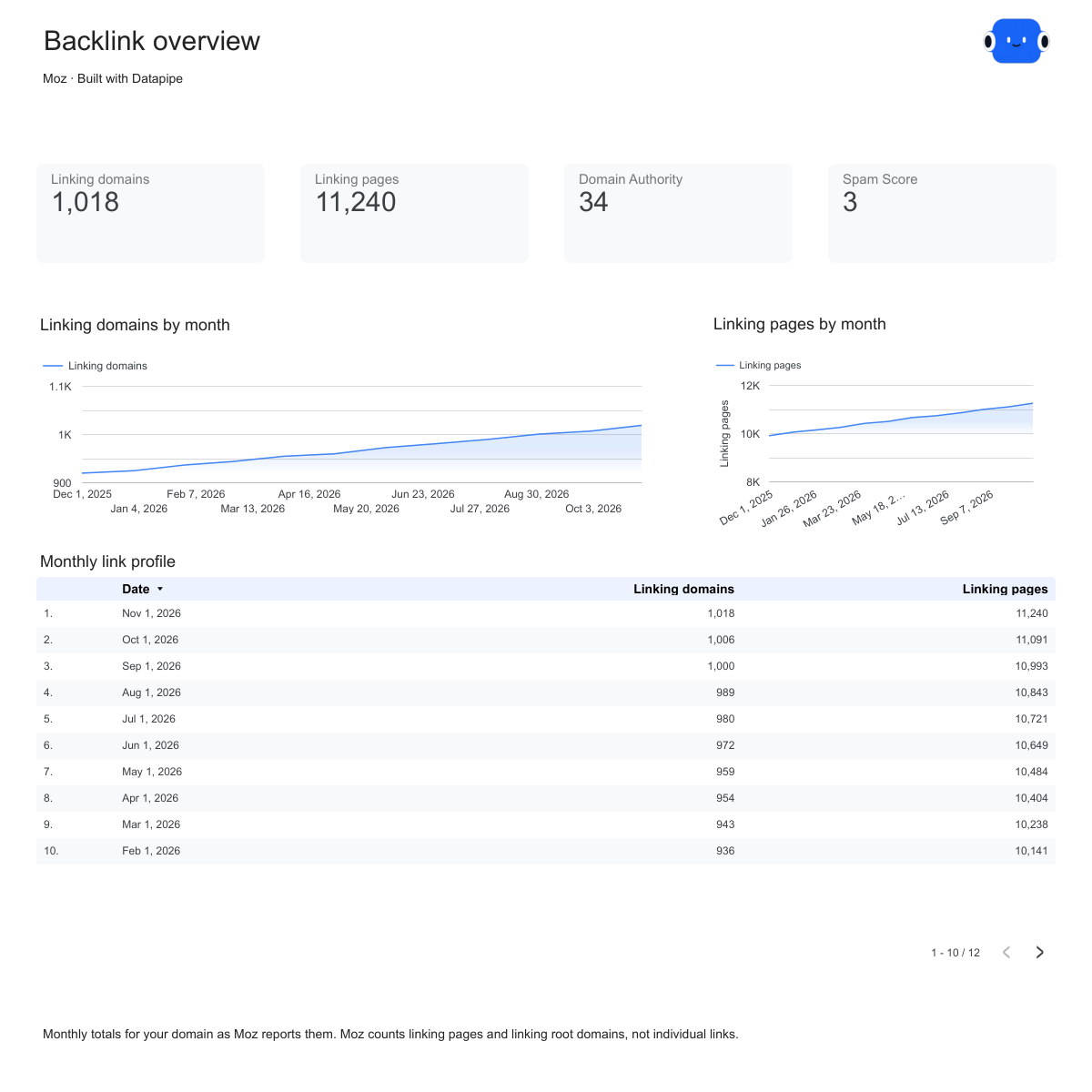
Domain Authority, linking pages and linking domains by month, and the domains, anchors and pages behind your links. One editable report filled from Moz.

A Google account is needed to save a copy.

Explore the report

Choose a page to see its charts and metrics.

Choose a report page to preview
Moz overview report page.
Watch your link profile grow. Open this page ↗
Moz linking domains report page.
See who links to you. Open this page ↗
Moz top pages report page.
Find your strongest pages. Open this page ↗
Moz start here report page.
Your reporting guide. Open this page ↗

Open interactive report ↗ · Download PDF · CSV

Make this report yours

  1. Preview the report

    Explore the pages, charts and filters.

  2. Save a free copy

    Add your logo and adjust the layout for your team or clients.

  3. Connect your account

    Choose the account you want this dashboard to report on.

Keep your dashboard up to date

Connect Moz. Datapipe updates the Google Sheet behind your dashboard every week.

MozSelected account
DatapipePrepare & refresh
Google SheetsPrivate report data
Data StudioYour dashboard

Setup, pricing and metrics

What does this Moz backlink report include?

Four pages: Start here, Overview, Linking domains and Top pages. Overview shows Domain Authority, linking pages, linking domains and Spam Score, with monthly trends. Linking domains shows your top 50 linking domains by Domain Authority and your top 25 anchors. Top pages shows your 25 strongest pages by Page Authority.

How do I use this template with my Moz account?

Add Moz as a data source in Datapipe with your Moz API token and your domain. Each refresh uses rows from your Moz API quota. Then create this dashboard and authorize Google Sheets separately. Datapipe prepares five worksheets (Backlink profile, Backlinks over time, Referring domains, Anchors and Top linked pages) and a copy link that replaces all five report sources. Save your private Data Studio report; scheduled refreshes update the same workbook.

Which numbers come from Moz?

Moz’s current link metrics for your domain (Domain Authority, linking pages, linking root domains, nofollow counts and Spam Score), monthly history for linking pages, linking domains and Domain Authority, your top 50 linking domains, your top 25 anchors and your 25 strongest pages. Moz counts linking pages rather than individual links and does not report first-seen dates for anchors.

Can I compare authority scores across tools?

No. Each tool scores authority its own way, so the dashboard keeps the tool’s own score and names it. Compare scores from the same tool over time rather than across tools.

Why don’t the lists add up to my total backlinks?

The lists show the top referring domains, anchors and pages only. The total counts every link the tool found, including links from domains outside the top of the list.

Is the report template free?

The template, editable Data Studio copy, PDF and CSV are free. You need a Google account to save a copy. Datapipe plans apply when you connect and refresh your own data.

Make it your next report.