Datapipe
Start free
← All report templates

WordPress · Free Data Studio template

WordPress content report template
See what is published. Find what needs another look.

Posts, pages, publishing status and update dates. A current content inventory for a more focused editorial review.

A Google account is needed to save a copy.

Explore the report

Choose a page to see its charts and metrics.

Choose a report page to preview
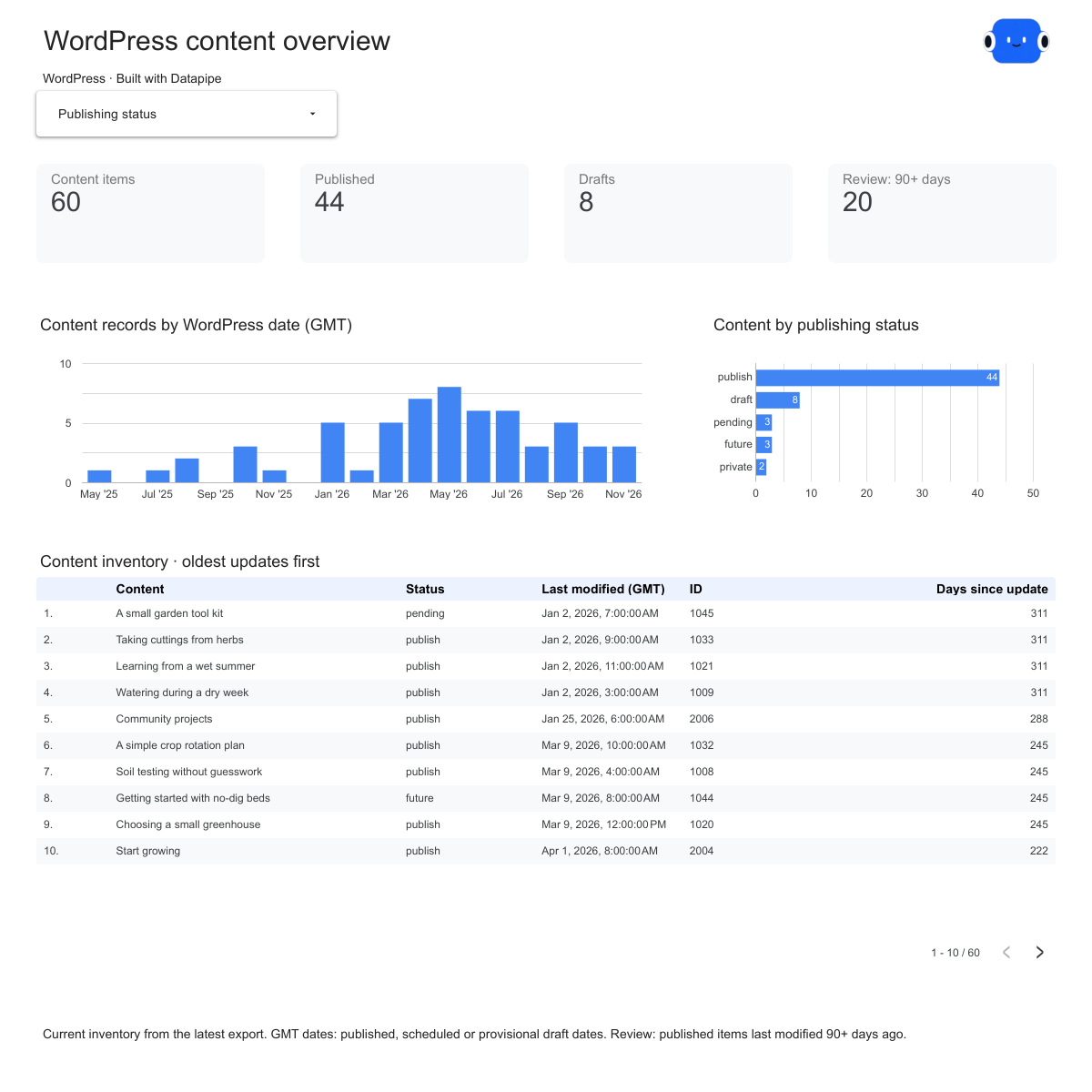
WordPress overview report page.
See the current inventory. Open this page ↗
WordPress posts report page.
Review your publishing backlog. Open this page ↗
WordPress pages report page.
Keep evergreen pages in view. Open this page ↗
WordPress maintenance report page.
Start a practical review queue. Open this page ↗
WordPress start here report page.
Your reporting guide. Open this page ↗

Open interactive report ↗ · Download PDF · CSV

Make this report yours

  1. Preview the report

    Explore the pages, charts and filters.

  2. Save a free copy

    Add your logo and adjust the layout for your team or clients.

  3. Connect your account

    Choose the account you want this dashboard to report on.

Keep your dashboard up to date

Connect your WordPress site. Datapipe refreshes the workbook behind your content inventory.

WordPressSelected account
DatapipePrepare & refresh
Google SheetsPrivate report data
Data StudioYour dashboard

Setup, pricing and metrics

What does this WordPress report include?

The current posts and pages visible to the connected WordPress user: titles, IDs, native publishing status, URLs, author IDs, GMT dates and taxonomy IDs. The dashboard adds counts and time-since-modification flags from those fields. It does not include traffic, rankings, conversions or a content quality score.

Does it reconstruct historical inventory?

No. Each refresh reads the current inventory and replaces the same worksheets. The four worksheets are separate views of the same records; do not add their totals together. The date distribution describes native content dates in the current records, not a historical snapshot of the site. Publication dates apply to published items; a future item has its scheduled date and draft dates can be provisional.

What does Review: 90+ days mean?

An item must have publish status and a native modification timestamp at least 90 days before the read. The flag is a starting point for an editorial review. Age does not establish that a page is inaccurate, low quality or performing badly. Missing modification dates stay unavailable.

How do I use my own WordPress site?

Add WordPress as a data source in the intended Datapipe project using the supported authorization for your site. Choose that site explicitly, create this dashboard and authorize Google Sheets separately. Datapipe prepares the current posts and pages in four worksheets, with a Data Studio copy link that replaces every source.

Can the export include private content?

Yes, if the connected WordPress user can read it. Keep the workbook and Data Studio report Restricted.

Can I customize the report?

Save a copy in Data Studio, then change the logo, titles, colors, charts and layout for your team or clients.

Is the report template free?

The editable Data Studio copy, PDF and CSV are free. A Google account is needed to save a copy. Datapipe plans apply to connecting and refreshing your own data.

Make it your next report.