Start free
← All report templates

Google Business Profile · Free Data Studio template

Google Business Profile report template
See how people find your business on Google. Know what they do next.

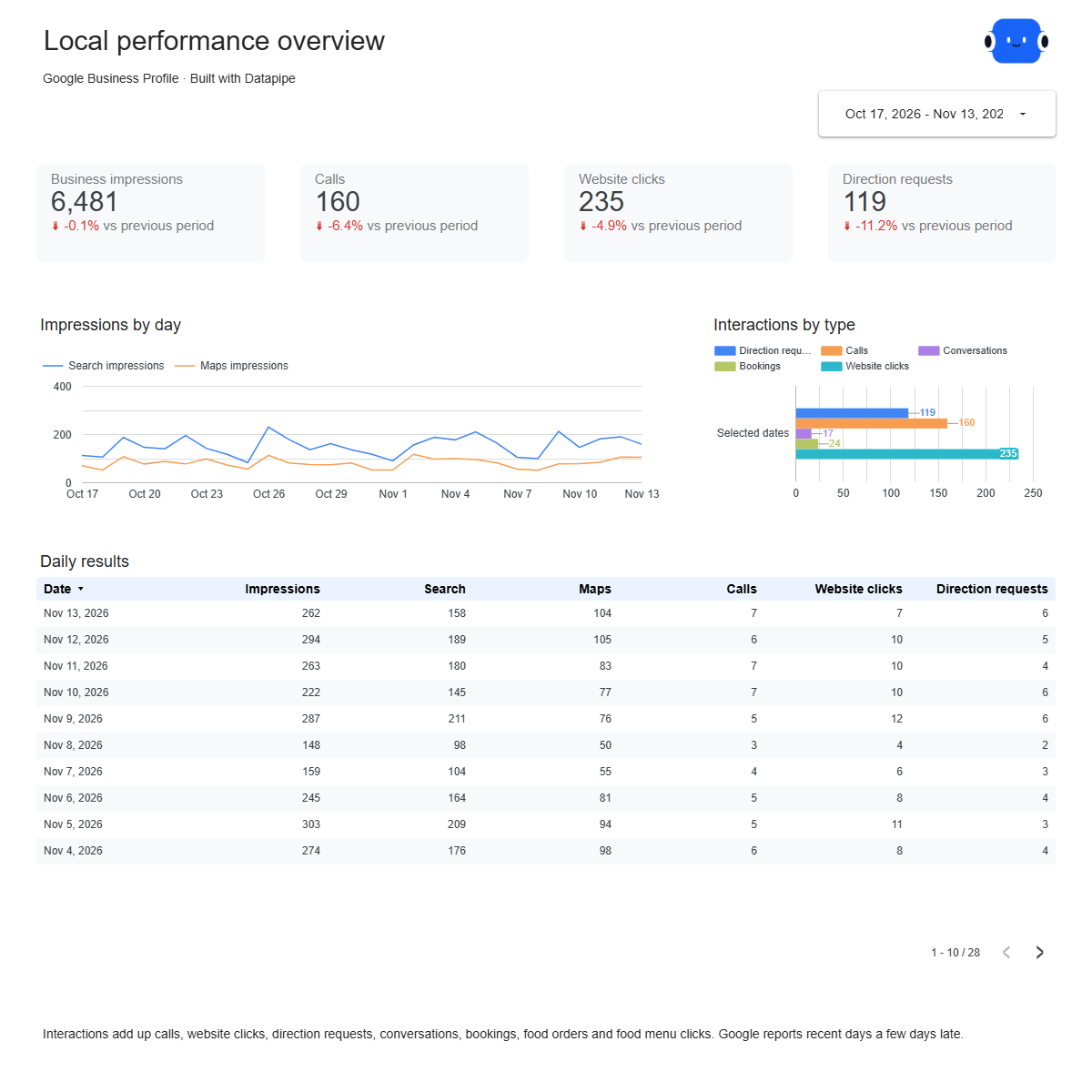
Impressions on Search and Maps, calls, website clicks and direction requests against the previous period, the searches that showed your location, and every new review. One editable report for a regular local performance review.

A Google account is needed to save a copy.

Explore the report

Choose a page to see its charts and metrics.

Choose a report page to preview
Google Business Profile overview report page.
See how often you were found. Open this page ↗
Google Business Profile search keywords report page.
Know the searches that show you. Open this page ↗
Google Business Profile reviews report page.
Keep up with every review. Open this page ↗
Google Business Profile start here report page.
Your reporting guide. Open this page ↗

Open interactive report ↗ · Download PDF · CSV

Make this report yours

  1. Preview the report

    Explore the pages, charts and filters.

  2. Save a free copy

    Add your logo and adjust the layout for your team or clients.

  3. Connect your account

    Choose the account you want this dashboard to report on.

Keep your dashboard up to date

Connect your Business Profile location. Datapipe updates the Google Sheet behind your dashboard on your schedule.

Google Business ProfileSelected account
DatapipePrepare & refresh
Google SheetsPrivate report data
Data StudioYour dashboard

Setup, pricing and metrics

What does this Google Business Profile report include?

Four pages: Start here, Overview, Search keywords and Reviews. Overview compares impressions, calls, website clicks and direction requests with the previous period and shows them by day. Search keywords lists the searches that showed your location each month. Reviews shows new reviews with their star rating and reply status, plus your current average rating.

How do I use this template with my own Business Profile?

Add Google Business Profile as a data source in Datapipe by signing in with a Google account that owns or manages the profile, choose the location, then create this dashboard. Authorize Google Sheets separately. Datapipe prepares four worksheets and your private Data Studio copy; scheduled refreshes update the same workbook.

Why are the last few days zero?

Google reports Business Profile performance a few days late. Each refresh replaces the period with Google’s latest numbers, so recent days fill in over time.

Why do some keywords show “Under 15” instead of a number?

Google shows the exact count only for searches with enough impressions. For the rest it gives a threshold, so the report shows “Under 15” rather than inventing a number. Keywords are reported for complete months only.

What counts as an interaction?

Calls, website clicks, direction requests, conversations, bookings, food orders and food menu clicks, added together. Each one is also shown on its own.

Which reviews are included?

Reviews created in the selected dates, with the reviewer’s name, star rating, review text and whether you replied. The average rating and total reviews are Google’s current figures for the whole profile.

Does the report cover several locations?

One location per dashboard. Add each location as its own data source and create a dashboard for each.

Is the template free?

The template, PDF and CSV are free. Datapipe plans apply to automatic refreshes from your Business Profile.

Make it your next report.