Start free
← All report templates

Freshdesk · Free Data Studio template

Freshdesk report template
See how fast your team replies, and where tickets wait.

Tickets created and resolved, first response and resolution times, SLA performance by priority, group and agent, and the open backlog. One editable report for a monthly support review.

A Google account is needed to save a copy.

Explore the report

Choose a page to see its charts and metrics.

Choose a report page to preview
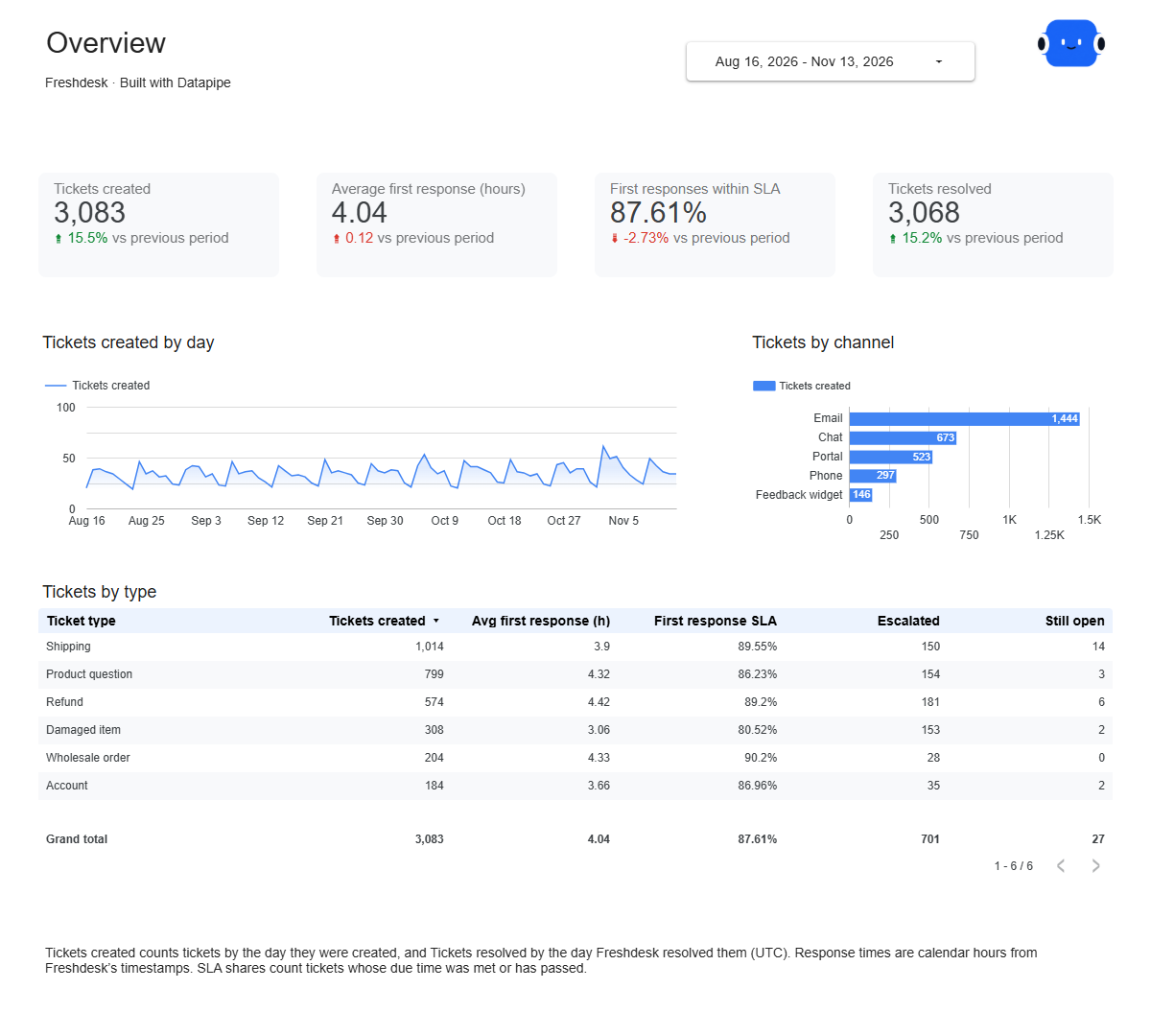
Freshdesk overview report page.
Know your ticket volume and reply speed. Open this page ↗
Freshdesk resolution report page.
Find where tickets take longest. Open this page ↗
Freshdesk open tickets report page.
See the backlog customers are waiting on. Open this page ↗
Freshdesk start here report page.
Your reporting guide. Open this page ↗

Open interactive report ↗ · Download PDF · CSV

Make this report yours

  1. Preview the report

    Explore the pages, charts and filters.

  2. Save a free copy

    Add your logo and adjust the layout for your team or clients.

  3. Connect your account

    Choose the account you want this dashboard to report on.

Keep your dashboard up to date

Add Freshdesk with your Freshdesk subdomain and an API key from an agent who can see every ticket. Datapipe reads your tickets with their response and resolution times and updates the Google Sheet behind your dashboard on your schedule.

FreshdeskSelected account
DatapipePrepare & refresh
Google SheetsPrivate report data
Data StudioYour dashboard

Setup, pricing and metrics

What does this Freshdesk report include?

Four pages: Start here, Overview, Resolution and Open tickets. Overview shows tickets created and resolved, average first response time and first responses within SLA, tickets by day, by channel and by type. Resolution shows resolution time and SLA, escalated tickets, tickets resolved by day, resolution time by priority, and results by agent. Open tickets shows the current backlog by group, priority, status and agent, with the oldest open tickets.

How do I use this template with my own Freshdesk account?

Add Freshdesk as a data source in Datapipe with your Freshdesk subdomain and an API key from an agent who can see every ticket. Then create this dashboard and authorize Google Sheets separately. Datapipe reads your tickets, groups, agents and status names, prepares three worksheets and your private Data Studio copy; scheduled refreshes update the same workbook.

How do the comparisons work?

Each card compares the dates you pick with the same number of days just before them. To fill those cards, each refresh reads the tickets created or updated since the start of that earlier period, so a 90-day dashboard reads about 180 days of ticket activity.

Why are response and resolution times different from Freshdesk’s own reports?

The report measures calendar hours between Freshdesk’s timestamps. Freshdesk’s own reports can count business hours only, which makes their times shorter when tickets arrive outside working hours. Averages divide total hours by the number of tickets, so a busy day counts more than a quiet one.

How is SLA performance counted?

First responses within SLA divides first replies sent by the first-response due time by the tickets whose due time was met or has passed. Resolved within SLA divides tickets resolved by their resolution due time by resolved tickets with a due time. Both use the due times Freshdesk set from your SLA policies.

Which days and tickets are included?

Days are in UTC. Tickets created counts tickets by the day they were created, and Tickets resolved by the day Freshdesk resolved them. Spam, deleted and archived tickets are left out. Open tickets shows tickets that are not resolved or closed at the latest refresh; an open ticket with no update since the start of the comparison period is not included.

Why aren’t customer satisfaction and first contact resolution included?

Freshdesk keeps satisfaction results separately for each survey, so they can’t be combined into one score without choosing a survey. First contact resolution needs every ticket’s full conversation, which would mean an extra request for each ticket.

Is the template free?

The template, PDF and CSV are free. Datapipe plans apply to automatic refreshes for your account.

Make it your next report.