Start free
← All report templates

ActiveCampaign · Free Data Studio template

ActiveCampaign report template
See which emails work, and how your lists and automations are doing.

Every broadcast with its opens, clicks and unsubscribes against the previous period, each email list’s contacts by status and every automation’s results. One editable report for a monthly email review.

A Google account is needed to save a copy.

Explore the report

Choose a page to see its charts and metrics.

Choose a report page to preview
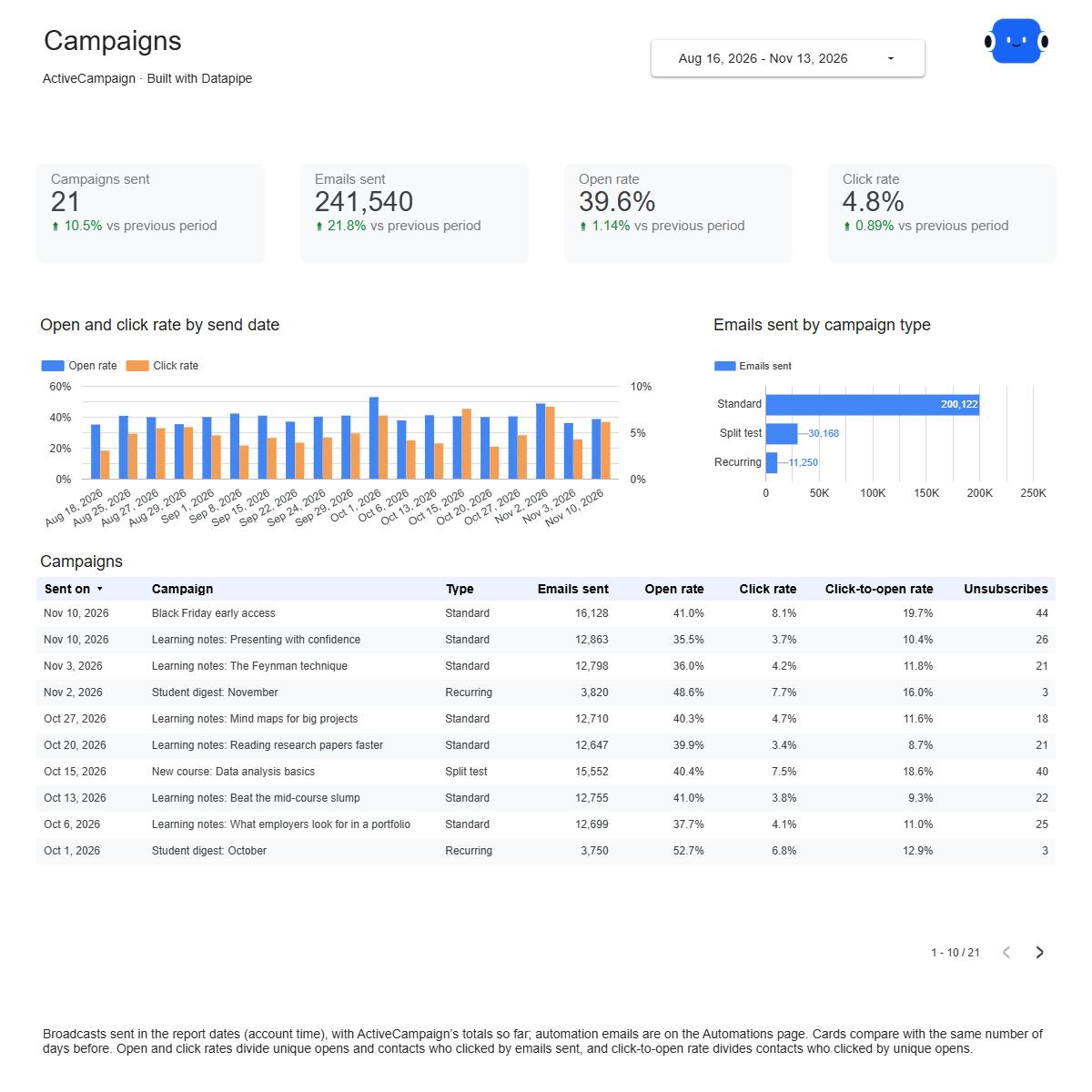
ActiveCampaign campaigns report page.
See which emails get opened and clicked. Open this page ↗
ActiveCampaign audience report page.
Check the health of each list. Open this page ↗
ActiveCampaign automations report page.
Know what your automations deliver. Open this page ↗
ActiveCampaign start here report page.
Your reporting guide. Open this page ↗

Open interactive report ↗ · Download PDF · CSV

Make this report yours

  1. Preview the report

    Explore the pages, charts and filters.

  2. Save a free copy

    Add your logo and adjust the layout for your team or clients.

  3. Connect your account

    Choose the account you want this dashboard to report on.

Keep your dashboard up to date

Add ActiveCampaign with the API URL and key from Settings > Developer. Datapipe reads your campaigns, lists and automations and updates the Google Sheet behind your dashboard on your schedule.

ActiveCampaignSelected account
DatapipePrepare & refresh
Google SheetsPrivate report data
Data StudioYour dashboard

Setup, pricing and metrics

What does this ActiveCampaign report include?

Four pages: Start here, Campaigns, Audience and Automations. Campaigns shows every broadcast sent in the date range with emails sent, open, click and click-to-open rates and unsubscribes, and compares the totals with the previous period. Audience shows each email list’s active, unsubscribed, unconfirmed and bounced contacts with its unsubscribed and bounced share. Automations shows each automation’s status, contacts entered and exited, and its emails with their rates.

How do I use this template with my own ActiveCampaign account?

Add ActiveCampaign as a data source in Datapipe with the API URL and key from Settings > Developer in ActiveCampaign. Then create this dashboard and authorize Google Sheets separately. Datapipe reads your campaigns, lists and automations, prepares three worksheets and your private Data Studio copy; scheduled refreshes update the same workbook.

Which campaigns are included?

Broadcasts with a send date in the date range, in your account’s time zone. Drafts are left out, and automation emails appear on the Automations page instead.

How do the comparisons work?

Each card compares the dates you pick with the same number of days just before them. To fill those cards, each refresh reads the campaigns sent since the start of that earlier period.

How are the rates worked out?

Open rate is unique opens divided by emails sent, and click rate is contacts who clicked divided by emails sent. The totals divide the combined counts, so a large campaign counts more than a small one. Opens and clicks keep counting after a send, so recent campaigns can rise between refreshes.

Why aren’t spam complaints or list open rates shown?

ActiveCampaign doesn’t report spam complaints per campaign, and it reports opens and clicks per campaign rather than per list, so the report doesn’t show them.

Why don’t the list counts add up to my total contacts?

One contact can be on several lists, so adding list counts together counts some people more than once. The Audience and Automations pages show your account as it is on the day of the refresh.

Is the template free?

The template, PDF and CSV are free. Datapipe plans apply to automatic refreshes for your account.

Make it your next report.